Participant
January 17, 2019
Question

Libraries won't sync to web

  • January 17, 2019
  • 1 reply
  • 1054 views

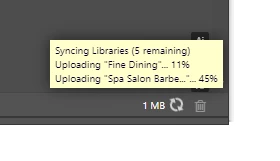
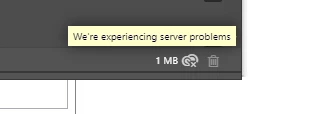
Hi - I am having issues getting my libraries to sync to the web. All of my libraries appear in my panel, however they never sync to the cloud, nor can I access them on other devices. Everytime I open a program it tries to sync them but it never gets under 1MB & eventually I get the 'We're experiencing server problems' error. This has been ongoing for about a month now. I have been working with our IT department to make sure we are not blocking anything. I can get to assets.adobe.com/libraries. Additionally, we aren't blocking any of these urls:

  • ccmdls.adobe.com:443
  • ims-prod06.adobelogin.com:443
  • na1r.services.adobe.com:443
  • prod-rel-ffc-ccm.oobesaas.adobe.com:443
  • lm.licenses.adobe.com:443 !
  • ccmdl.adobe.com:80
  • swupmf.adobe.com:80
  • swupdl.adobe.com:80

I have also checked: Adobe Status  several time and the cloud doesn't seem to be experiencing issues.

Any assistance is greatly appreciated.

Thanks!

Tricia


This topic has been closed for replies.

1 reply

Adobe Employee
April 12, 2019

Hello Tricia,

Thank you for trying initial debugging steps and contacting Adobe ID. As a next step, we'd like to look at your Creative Cloud log files. Please see the direct message I sent you with more information about how to get your log files and my email address to send them to.

Thank you,

Molly Donohue

Web Engineer - CC Libraries and Assets Web

alwaysnoticing
Participant
May 11, 2019

I'm having the same issue. I create a NEW LIBRARY and, it doesn't show up online. However, when I add a new image to a current library the new image syncs with the online library.

rocheAdobe9447383
Adobe Employee
Adobe Employee
May 17, 2019

Can you describe your workflow in a little more detail? Are you creating the new library from the website, or from the Libraries panel in a desktop application? Also, is this true 100% of the time, or only occasionally?

Looking forward to your response, thanks.