

JaydenDelroy
Inspiring
September 24, 2020
Answered

Library Sync Error - Fix instructions do not work.
  • September 24, 2020
  • 8 replies
  • 6296 views


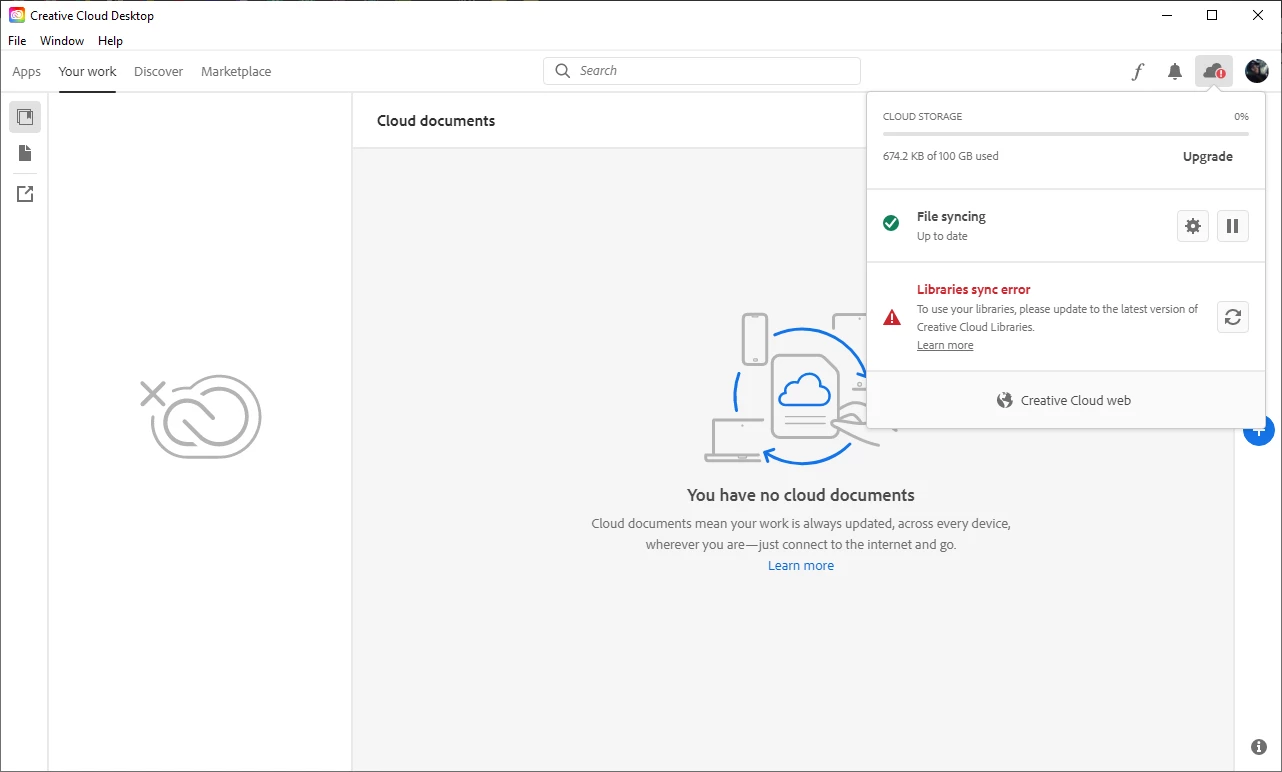
I have just installed windows 10, subscribed to Adobe CC and installed a few apps. I am getting this error in regards to the libraries being synced. I clicked the link and followed all the instructions to try and fix it. It didn't work.

Please advise, thank you in advance!

Jayden

This topic has been closed for replies.
Correct answer JaydenDelroy

My issue has seemingly resolved itself as of right now! amazing how these issues happen for no apparent reason and are resolved by themselves. HMM.

8 replies

JaydenDelroy
JaydenDelroyAuthorCorrect answer
Inspiring
September 25, 2020

My issue has seemingly resolved itself as of right now! amazing how these issues happen for no apparent reason and are resolved by themselves. HMM.

Participant
September 25, 2020

ITS FIXED GUYS AND GIRLS this is how to fix it....

1) open up your adobe creative cloud and sign out DO not remove it from your screen leave it up on your sceen but signed out

2) open your Task manager and close ALL adobe processes and apps

3) install the libraries panel from the following link

https://helpx.adobe.com/in/creative-cloud/kb/libraries-panel-not-working.html

4) scroll right to the bottom and pick your windows or mac and download it

5) unzip it and the click the set up file

6) once you have done all of it open up your creative clould and sign in let it finish  doing the update and that should have fixed it.

hope this helps you all

JaydenDelroy
Inspiring
September 25, 2020

This doesn't work. I already tried this and so did the Customer Support Technician who took control of my PC.

Inspiring
September 25, 2020

No heelp but have the same issue.  Adobe please get fixed

Inspiring
September 25, 2020

All of a sudden all now ok

philipn95815980
Inspiring
September 25, 2020

Yes, same here, back to normal - for the time being.  What a waste of a morning follow all those "guides"..

philipn95815980
Inspiring
September 25, 2020

Had this problem too.  None of the "solutions" worked.  A lot of wasted time following procedures that brought me back to square one.

Participant
September 25, 2020

Been trying to get this sorted out for the last two days NO ONE AT ADOBE is able to help keep getting passed on to someone else been on this now for a hour so far today and still waitting for someone to get back to me over it THIS IS A JOKE ADOBE GET YOUR FINGER OUT AND SORT OUT THE PROBLEM

JaydenDelroy
Inspiring
September 25, 2020

Same here, I've been told somoene will contact me in the next 48 hours to try and find a solution. One of the support iperatives took control for an hour to troubleshoot what I had already told them I'd done (in a fraction of the time) to no avail. I don't think the front line techincal responders have very little training and only know how to fix basic issues. Hopefully I will be able ot connect to someone who knows what they are doing.

JaydenDelroy
Inspiring
September 24, 2020

Very frustrating. Adobe surely knows how to fix! I have a installed on a fresh install of windows and adobe CC was the first thinkg I installed so there should be no interference from other apps or issues with files. Hmm.

Mohamed Metwally
Participant
September 24, 2020

I'm Have the same problem and also i didn't find any solution yet ....

also, I face another problems like 

Participant
September 24, 2020

 I am getting the same message as well the support team do not know how to help me on this keep getting sent to diffrent specialists and still no luck COME ON ADOBE GET IT FIXED