
Matthew Gibbon
Participant
October 2, 2023
Question

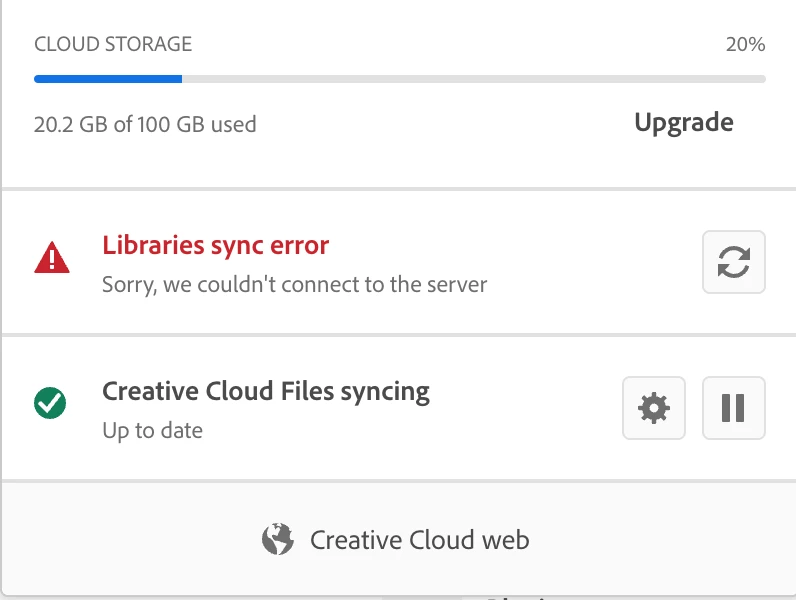
Library sync issue can't connect to server

  • October 2, 2023
  • 3 replies
  • 345 views

My library sync on 3 different accounts in the office has the same issue that can not connect to the server for the past 2 -3 months.

This topic has been closed for replies.

3 replies

Adobe Employee
October 18, 2023

Hi Matthew,

Sorry to know that you are running into sync issues for past 2-3 months. I am part of CC Libraries Team in Adobe and would like to resolve the issue for you. Please check your DM for more info on how to connect.

Matthew Gibbon
Participant
October 9, 2023

NO nothing helped, so I left as is as not Adobe could solve this one.

kglad
Community Expert
Community Expert
October 9, 2023

@Matthew Gibbon 


you followed my suggestions and they failed?


you then contacted adobe support and they were unable to fix this?

Matthew Gibbon
Participant
October 9, 2023

Yes nobody even Adobe Support could not fix. But thnax for the help, much apprecited.


kglad
Community Expert
Community Expert
October 2, 2023

first, update your os and then restart your computer. if that fails proceed to the following steps:


1. Delete all folders that start with “CC_LIBRARIES_PANEL_EXTENSION_xx_xx_xx” in this location:


WIN: C:\Program Files (x86)\Common Files\Adobe\CEP\extensions

MAC: Macintosh HD⁩ ▸ ⁨Library⁩ ▸ ⁨Application Support⁩ ▸ ⁨Adobe⁩ ▸ ⁨CEP⁩ -> extensions


2. Follow the steps of Solution 2 in this article: https://helpx.adobe.com/creative-cloud/kb/libraries-panel-not-working.html


Before trying the steps - please, make sure you killed the CCLibraries process in Task Manager / Activity Monitor, as well as you have quit all Adobe related products.


<moved from cc desktop bugs>