
Participant
October 24, 2017
Answered

Managing files in the cloud.

  • October 24, 2017
  • 1 reply
  • 428 views

I would like to try this new version of Lightroom, however after uploading my previous Lightroom files I have run out of space and I am not willing to start spending the money for this until I have made the decision to use it. How can I "REMOVE" files from the cloud so that I can start fresh and see how this works?
This topic has been closed for replies.
Correct answer David__B

MVyrros,

For the Lightroom storage you might try this:


Go to Adobe Photoshop Lightroom and sign in with the Adobe ID you use in Lightroom

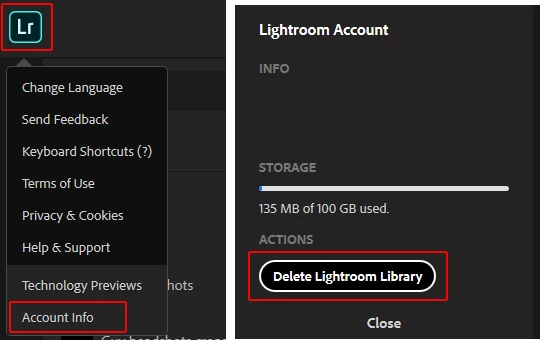
From there click the Lightroom symbol in the top left corner of the page and select Account Info, within account info should be an option to delete your Lightroom Library. I think this would reset your storage use.

1 reply

David__B
Adobe Employee
Adobe Employee
October 24, 2017

Hi MVyrros,

Where are you seeing that you have ran out of space? Space used by Lightroom is separate from Creative Cloud storage. For Creative Cloud storage you might try emptying your archive as described here: Browse, sync, and manage Adobe Creative Cloud assets

Hope that helps,

- Dave

MVyrrosAuthor
Participant
October 24, 2017

David,

Thank you for your reply. The problem is that I uploaded a few thousand images to the Lightroom cloud and have no more space available there. I would like to remove most of them to allow me to do a trial run of this new software. Unfortunately the link you sent me indicates specific links to specific questions, however these links are broken. As an example this link takes you to a page error 404:

https://www.adobe.com/content/help/en/lightroom-cc/using/organize-photos.html

David__B
Adobe Employee
David__BCorrect answer
Adobe Employee
October 24, 2017

MVyrros,

For the Lightroom storage you might try this:


Go to Adobe Photoshop Lightroom and sign in with the Adobe ID you use in Lightroom

From there click the Lightroom symbol in the top left corner of the page and select Account Info, within account info should be an option to delete your Lightroom Library. I think this would reset your storage use.