
jacravensbergen
Participant
September 25, 2015
Answered

my green check marks are not showing in my local environment
  • September 25, 2015
  • 2 replies
  • 6667 views

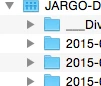
The problem is; i don't see green checkmarks that show that my file is synchronized. But i can see (and my collegues also) that the files are complete.
Does anybody know what's the problem here?

This topic has been closed for replies.
Correct answer Ashley Wagstaffe

Hi Jac,

Just to double check that the Finder Sync Extension is enabled:

  • Go to Apple Menu > System Preferences
  • Choose Extensions
  • You should see A Finder Item in the left hand menu - Select this
  • Is the Core Sync item check box ticked?

Warmest wishes,

Ashley

2 replies

wharress
Community Manager
Community Manager
October 5, 2015

Hi,

Could you look again, the icons have moved slightly, see my image below)

jacravensbergen
Participant
October 5, 2015

Dear Wharress,

Thanx for your reply. I see what you mean, but on my system it's still the same problem... my operating system is yosemite by the way.

See my screenshot for an example of my creative cloud files. Still no check marks of status signs.

Jac

Participating Frequently
October 5, 2015

Same for me... no green check marks. OSX Yosemite 10.10.5

@Jac, I noticed this problem the first time I did an update on the CC desktop app on October 25th. I run the latest version, see this link:

Creative Cloud Help | Creative Cloud desktop app | Release Notes

Participating Frequently
September 29, 2015

Same for me, since 6 days. I updated the Creative Cloud desktop app that morning, and afterwards the green checkmarks were gone...