



BenjaminBern
Inspiring
Feb 2, 2024 9:25 PM UTC
Answered

New folder shortcut can't be removed
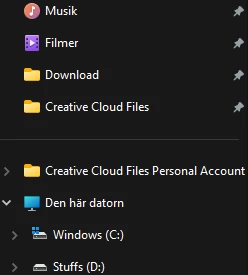
As seen in the picture above, the old creative cloud folder is still there for me since i backed it all up, that's fine. But what is new is that other bottom folder, the Creative Cloud Files Personal Account... 
It's empty for me now but I can't remove it from the list at all. Any ideas?

This topic is closed to new replies. Start a new post to keep the conversation going.
BenjaminBern
BenjaminBernCorrect answer
Inspiring
Feb 4, 2024 9:13 PM UTC

Update here. I now followed all the steps but the folder still remains. Unsure of what to do next.


Update again, I seem to have removed it by messing around in the registry.

14 replies

Phi.Def
Inspiring
Apr 28, 2024 8:28 PM UTC

Is it just me or does it seem absurd that they discontinued the service, but didn't provide an automatic removal of the sidebar icon to the non-existent cloud folder??

Translate
kglad
Community Expert
Community Expert
Feb 2, 2024 9:37 PM UTC

it requires a regedit to remove.

Translate
BenjaminBern
Inspiring
Feb 2, 2024 9:56 PM UTC

I did use an offical tool thing to remove it but it didn't do anything. I'm guessing this is because of the recent change to remove the folder all together for new users.

Translate
kglad
Community Expert
Community Expert
Feb 2, 2024 10:03 PM UTC

did you restart your computer after using?


if yes, what tool?

Translate