tommc1
Participant
Sep 9, 2016 9:17 PM UTC
Answered

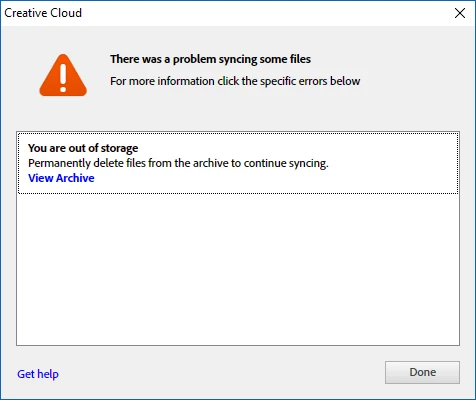
Out of storage message

Hi,

I've seen this question asked in multiple discussions, but it always seems to be answered by pm or email.

My archive is empty and I only have a handful of pictures stored on the cloud and this message keeps popping up.

Tom
This topic is closed to new replies. Start a new post to keep the conversation going.
Ken G. Rice
Ken G. RiceCorrect answer
Participating Frequently
Sep 12, 2016 5:51 AM UTC

Which plan are you subscribed to?

If you are subscribed to the Photography plan (Photoshop and Lightroom) then this plan only comes with a 2 GB storage quota.

If you are subscribed to the full Creative Cloud or an individual application plan then you will have a 20 GB storage quota.

4 replies

Ken G. Rice
Participating Frequently
Sep 9, 2016 11:00 PM UTC

Your Archive online is empty. In the Files folder you have 216 files stored. Most of these are Canon RAW files so not too surprising that they are taking up 2.17 GB or your 2 GB storage quota.

Translate
tommc1
tommc1Author
Participant
Sep 10, 2016 12:14 AM UTC

I thought I got 20 GB as a CC subscriber

Translate
Ken G. Rice
Ken G. RiceCorrect answer
Participating Frequently
Sep 12, 2016 5:51 AM UTC

Which plan are you subscribed to?

If you are subscribed to the Photography plan (Photoshop and Lightroom) then this plan only comes with a 2 GB storage quota.

If you are subscribed to the full Creative Cloud or an individual application plan then you will have a 20 GB storage quota.

Translate