

Ecphotographer
Inspiring
July 19, 2023
Answered

Please add more storage space options for Creative Subscribers

  • July 19, 2023
  • 3 replies
  • 561 views

I need more storage space to not only work on client files by my own portfolio. I work with photos and now videos.


Inspite my user name, I have 16 years of desktop publishing experience. With the advent of social media and the 'gig economy',  I use lightroonm via tablet to ingest my content on location --triage, use photoshop and premiere to execute surgery at my desk, and back to my tablet for my end-of-day post-operative work. Projects run longer than expected and self-promotion work takes a back seat.


So, here's the killer. Under the photography plan can upgrade to 1TB of storage, but as a designer, I'm stuck with 100gb?  This really shouldn't be a problem.

E
 

This topic has been closed for replies.
Correct answer kglad

@Ecphotographer 


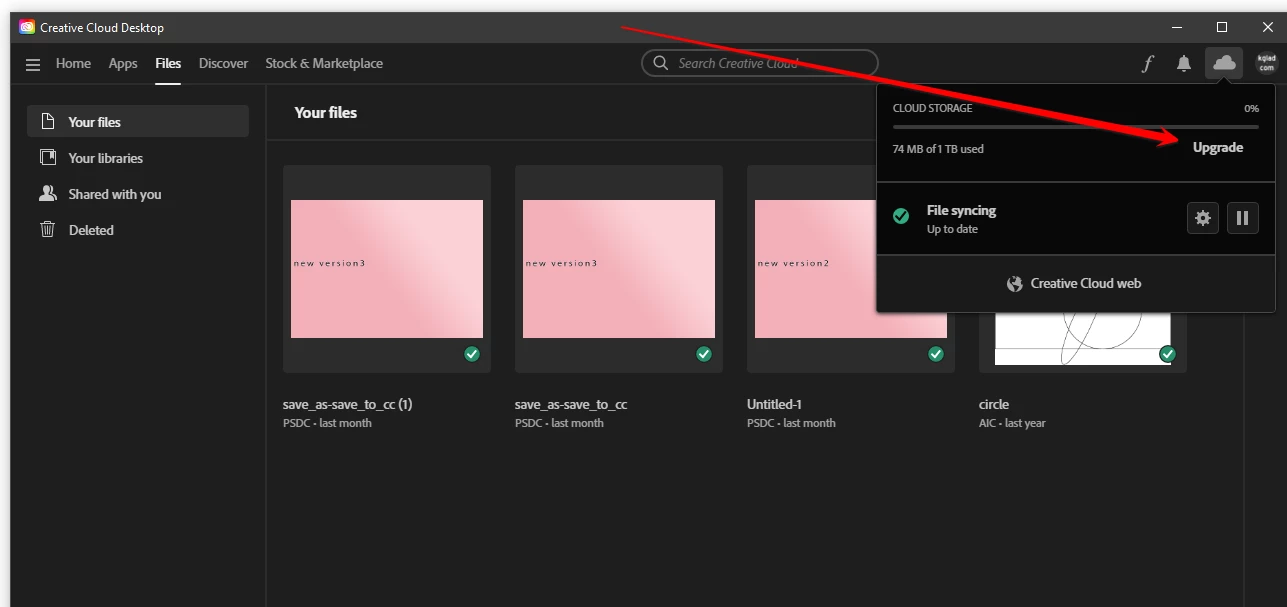
did you open your cc desktop app > click the cloud icon at the upper right > click upgrade


3 replies

Ecphotographer
Inspiring
July 20, 2023

This is my current plan. As indicated in ther screen shot, there's no option to 'Upgrade' the storage. So if everyone is suggesting that I need to choose a 'second full subcription' and that won't cause problems with my current subscription, so be it. This might be a matter of semantics, but I hate experimenting on purchases and then trying to fix it after the fact.

kglad
Community Expert
kgladCommunity ExpertCorrect answer
Community Expert
July 20, 2023

@Ecphotographer 


did you open your cc desktop app > click the cloud icon at the upper right > click upgrade


Ecphotographer
Inspiring
July 20, 2023

Thank you kglad,

I've been up and down with the lightroom apps, linking to various web pages and only finding the subscription I already have.

Community Expert
July 20, 2023

I am not sure what your question is. I can see a Lightroom plan as well with 1TB storage.

https://www.adobe.com/in/creativecloud/plans.html

To upgrade your storage plan checkout the following article

https://helpx.adobe.com/x-productkb/global/upgrade-creative-cloud-storage.html

-Manan

-Manan
kglad
Community Expert
Community Expert
July 19, 2023

you can purchase more storage.