
May 3, 2022
Question

Portfolio - Chargement d'images

  • May 3, 2022
  • 2 replies
  • 989 views

Lorsque j'essaie de charger des images dans une page Portfolio. J'ai essayé directement à partir du Finder, ensuite d'un album Lightroom; peu importe la méthode le message que je reçois en rouge à l'écran est le suivant:

Impossible de charger "Nom du fichier.jpg". Veuillez réessayer

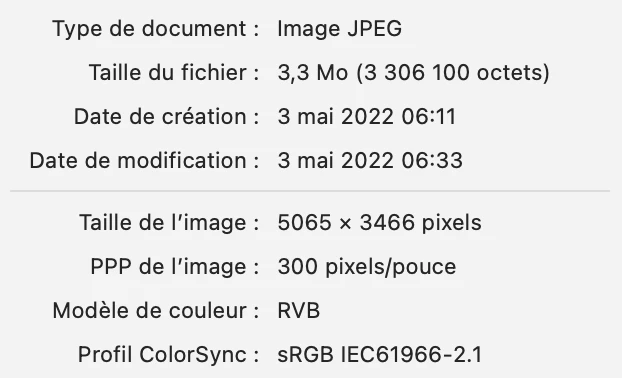
Les spécifications de la photo sont :
 

This topic has been closed for replies.

2 replies

Nancy OShea
Community Expert
Community Expert
May 7, 2022

Try adding images directly from Portfolio's editing panel.

https://helpx.adobe.com/bridge/using/publish-assets-adobe-portfolio.html


But beforehand, please optimize images for the web in Photoshop or Lightroom.   Smaller file size ensures faster loading web pages. See screenshot from Photoshop's Export As panel.


Nancy O'Shea— Product User & Community Expert
May 7, 2022

Thank you for taking the time to reply. I've found the source of my loading problem... it doesn't work in the Firefox environment; I have to use Safari to be able to load on Portfolio. I am using Firefox 100.0 (64bit).
This is a bit disappointing and annoying.
Thanks again, I appreciate it.

Nancy OShea
Community Expert
Community Expert
May 7, 2022

Turn off script blockers in your browser.


Nancy O'Shea— Product User & Community Expert
kglad
Community Expert
Community Expert
May 5, 2022

<moved from download&install>