
GEELEACH
Participant
September 11, 2020
Answered

Sending files to cloud

  • September 11, 2020
  • 1 reply
  • 328 views

I have my photo files on my PC and want to sync with my cloud account. I have taken a subscription for 1 Tb of storage so know I can put my 345GB of photos there with room to spare. I just cannot work out how to link my cloud files and my pc files. It seems to want to duplicate my photofiles on my pc and tells me that I dont have enough storage on my C drive. Which of course I have not because I have my photo files there. What do I need to do to get my create cloud and pc working together?
This topic has been closed for replies.
Correct answer kglad

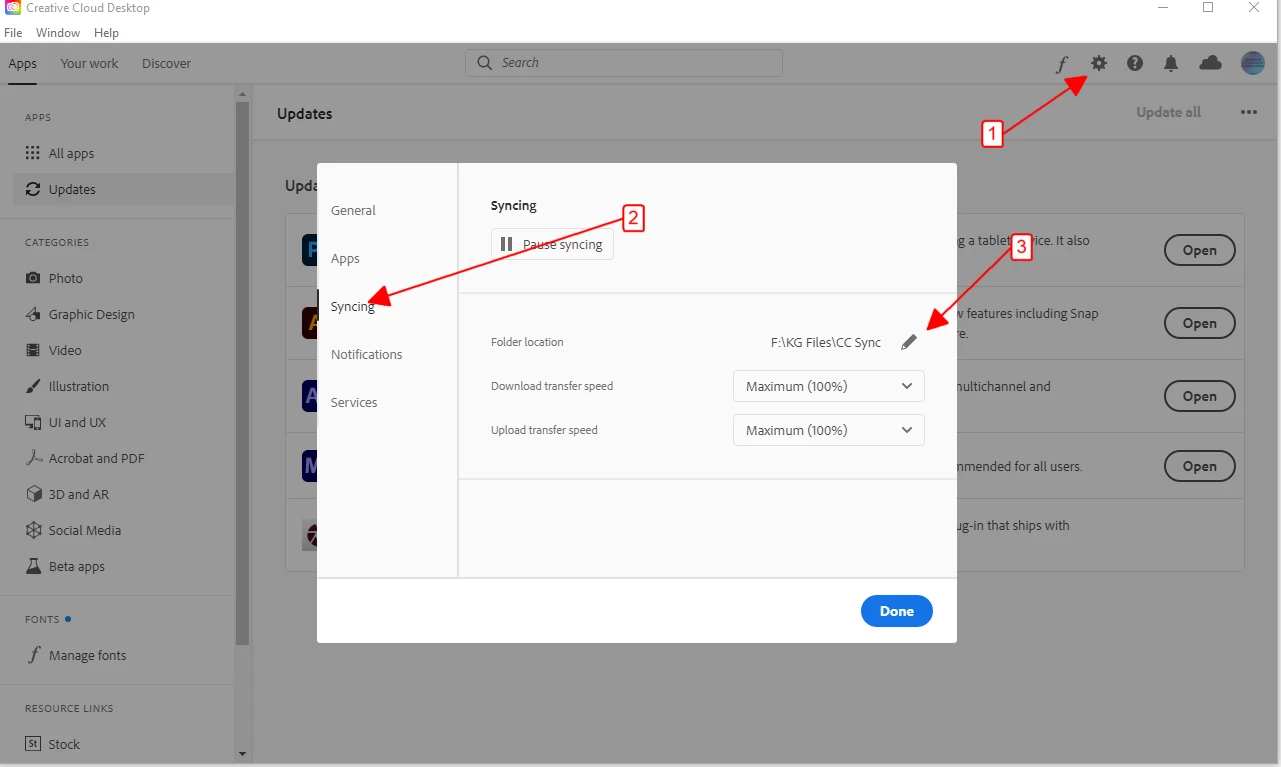
create your sync folder by clicking 1>2>3 in the cc desktop app


then move (using your local file browser) whatever your want into that folder, or just assign your sync folder to be the folder that contains your photos so they're not duplicated locally.

1 reply

kglad
Community Expert
kgladCommunity ExpertCorrect answer
Community Expert
September 11, 2020

create your sync folder by clicking 1>2>3 in the cc desktop app


then move (using your local file browser) whatever your want into that folder, or just assign your sync folder to be the folder that contains your photos so they're not duplicated locally.