
Participant
January 25, 2022
Answered

share button not available on cc library

  • January 25, 2022
  • 2 replies
  • 2324 views

the new CC library I created looks very different from the previous ones. in this one I'm not even able to get a share button. what is going on?
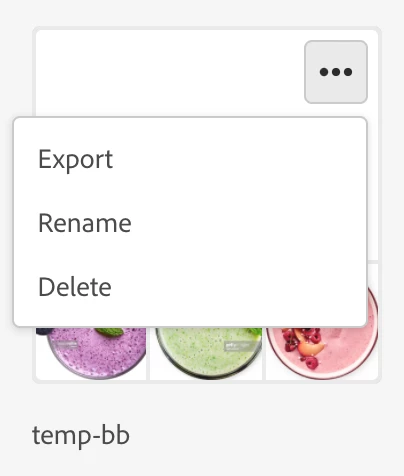
 this is the new library I just created, and there's no sharing or invite option
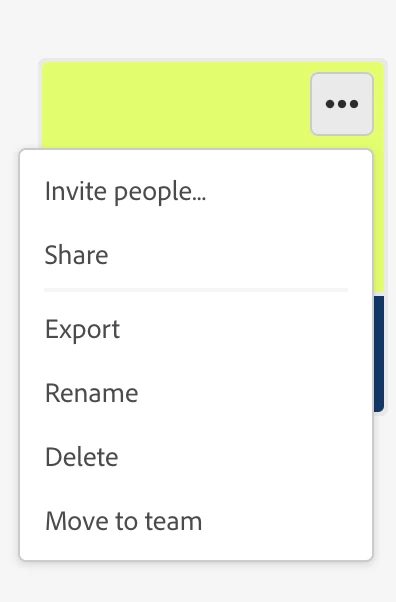


 the previous one I created the same way is still normal.


why?

This topic has been closed for replies.
Correct answer Akshay.

Hi EditThree,


I'm sorry you are encountering this experience. The root to this display is that the 'new library' is not completely synced to the cloud in this state, causing the share option to be unavailable. The team will look into addressing this soon and share an update following so. 


Thanks,
Akshay

CC Libraries Product Manager

2 replies

Akshay.Community ManagerCorrect answer
Community Manager
January 28, 2022

Hi EditThree,


I'm sorry you are encountering this experience. The root to this display is that the 'new library' is not completely synced to the cloud in this state, causing the share option to be unavailable. The team will look into addressing this soon and share an update following so. 


Thanks,
Akshay

CC Libraries Product Manager

EditThreeAuthor
Participant
January 29, 2022

thank you. please keep me posted.

I do not want to sync with adobe cloud anymore since it's taking way too much space in my hard drive. 

As a team we used to use adobe cloud as the team folder but because of a lot of issues we abondoned that. Now there are over 200gb files in adobe cloud and I do not want to have those files on my hard drive as well.

if there was an option to choose what part of the service I want to sync it'll be great. 

Ultimatedly, I want to sync with adobe cloud but just not the files.

Community Manager
January 31, 2022

Most definitely! 


I would also suggest visting this product feature page to vote on 'Selective Sync' and add any additional feedback you may have. We will take this into consideration on our list of priorities as well. 


https://creativecloudassets.uservoice.com/forums/905290-request-features/suggestions/31653889-selective-sync

David__B
Adobe Employee
Adobe Employee
January 26, 2022

Hi EditThree,


I wondered if the issue may be related to permissions limitations associated with the library. Is the one with limited options a team library? https://helpx.adobe.com/ca/creative-cloud/help/getting-started-team-libraries.html


EditThreeAuthor
Participant
January 26, 2022

no, both are personal library

David__B
Adobe Employee
Adobe Employee
January 26, 2022

Thanks for confirming. Does the behavior continue to happen with all new libraries? I wondered if the one with the issue somehow became damaged? If you export the one with the issue and then re-import it do you still see the limited options?

https://helpx.adobe.com/creative-cloud/help/import-export-creative-cloud-libraries.html