
Inspiring
November 7, 2020
Answered

Sorry we could not connect to the server

  • November 7, 2020
  • 3 replies
  • 496 views

Hello there,

I've searched for solutios for this problem and nothing works. I've had this for a while now. It suddenly happened while it used to work before. I am on a macbook pro 16, running the latest MacOS.
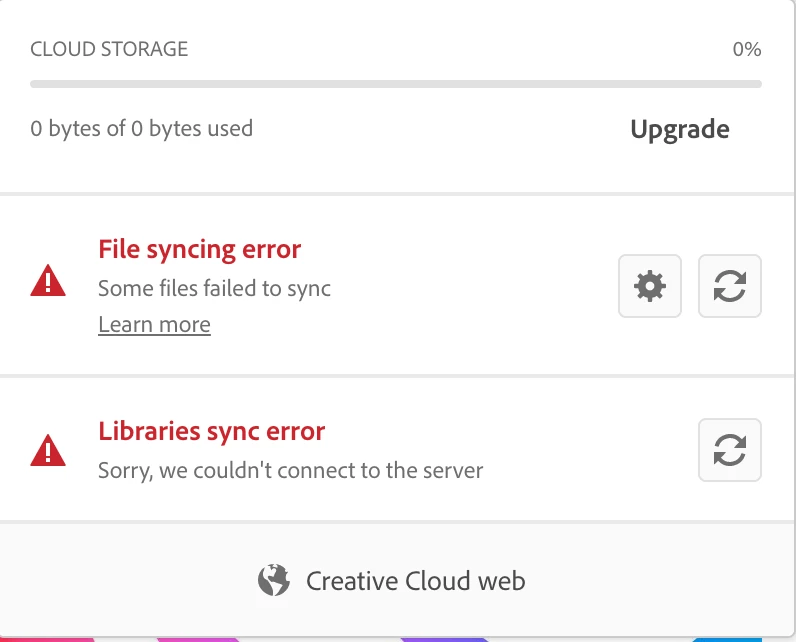
 

This topic has been closed for replies.
Correct answer Mahmood Zidan

I got this fixed by doing nothing. I guess it's a problem on Adobe's server side. Very frustrating but I guess that's life.

3 replies

Mahmood ZidanAuthorCorrect answer
Inspiring
November 15, 2020

I got this fixed by doing nothing. I guess it's a problem on Adobe's server side. Very frustrating but I guess that's life.

Nancy OShea
Community Expert
Community Expert
November 8, 2020
Nancy O'Shea— Product User & Community Expert
Inspiring
November 8, 2020

 It didn't work. 

ptions.tix
rm: /Users/mahmoodzidan/Library/Application Support/Adobe/CoreSync/options.tix: No such file or directory
Peru Bob
Community Expert
Community Expert
November 7, 2020

nothing works

What have you tried?

Inspiring
November 7, 2020

I disabled Firewall.

I quit the background tasks using Activity Monitor, then restarted the computer.

I Signed out and signed back in.

I turned off then on the file syncing from CC.


That's mainly it, I was tackling this problem for a while now, so I might've forgot other things I tried.