

kohesion
Inspiring
October 5, 2023
Answered

Storing Creative Cloud Libraries off your hard drive to save space

  • October 5, 2023
  • 1 reply
  • 972 views

Does anyone have any experience with storing these weird creative cloud system library storage folders (macbook) NOT on their hard drive? Could it be in Dropbox for example? Or, will I completely mess up my macbook if I attempt to do this?! Asking because these folders quickly become huge! 

This topic has been closed for replies.
Correct answer kglad

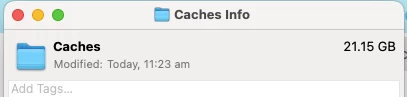
In fact, cache folders in general seem to be MASSIVE!

you can safely go to the online sites and  delete the files there.


there are tabs and links to check.


https://assets.adobe.com

https://lightroom.adobe.com

https://documentcloud.adobe.com

https://spark.adobe.com

1 reply

kglad
Community Expert
Community Expert
October 5, 2023

creative cloud libraries are stored on your local file system in the standard location for application data.


on mac this is "/Library/Application Support/Adobe"

on windows the location is something like "C:\Users\<username>AppData\Roaming\Adobe".


Please be careful not to tamper with these files in any way.

kohesion
kohesionAuthor
Inspiring
October 11, 2023

Thank you, I'll leave it alone then.

Are you able to tell me please, if I can safely delete any of the files in this folder (I know, you said don't touch them but 3GIG for old Indesign versions seems such a waste of hard drive space!)

kohesion
kohesionAuthor
Inspiring
October 11, 2023

In fact, cache folders in general seem to be MASSIVE!