

Eyewear.Studio
Participant
December 16, 2020
Question

Synch problem, Cloud empty but still got Alert of "unable to synch"

  • December 16, 2020
  • 1 reply
  • 326 views

Dear Comunity

I have a completely empty <Creative Cloud File> folder and a mirrored online <Creative Folder> where there are no file even on the trash bin. Display show: 0 byte of 100Gb Used. 

Despite this,  I have a persistent synchronous error which keeps appearing every time I launch the sync. 
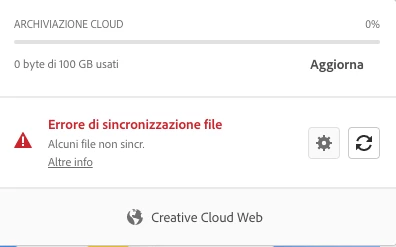
 

When I try to I launch sync this is the message...I don't know what is this PPE....



Both folder, online and on my desktop are empty.

I don't know how to solve this annoying error.

Thank you.


This topic has been closed for replies.

1 reply

kglad
Community Expert
Community Expert
December 16, 2020

check the lightrom and spark links in your cc files and empty your cc trash.


https://helpx.adobe.com/creative-cloud/help/delete-files-permanently.html

Eyewear.Studio
Participant
December 17, 2020

Thanks Kglad,

Too easy!

I did already did this steps.

Deleted files folder are empty as mentioned above.

I never use Lightroom but anyway I logged in to double check and there aren't files in deleted folder.


Any other ideas?

thanks


Stefano

kglad
Community Expert
Community Expert
December 17, 2020

is your local sync'd folder empty and your online cc files empty?


if so, using a browser that allows popups and cookies, contact adobe support during pst business hours by clicking here, https://helpx.adobe.com/contact.html

click contact us (in the lower right)
in the chat field, type AGENT
be patient, it can take quite a while to reach a human