Participating Frequently
December 14, 2017
Question

synchronization files aborted

  • December 14, 2017
  • 1 reply
  • 699 views

i, my synchronization files aborted each time with adobe cc app on windows 10

The message is just failed, i have no further information.

I already reinstalled the app but same fail
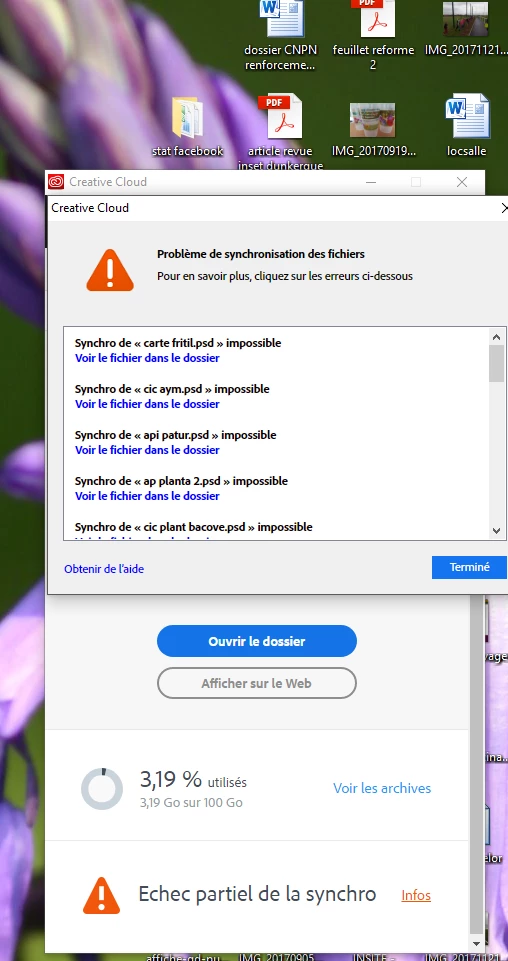
thx

This topic has been closed for replies.

1 reply

David__B
Adobe Employee
Adobe Employee
December 19, 2017

Hi Tibo,

Does emptying your online Archive make any difference?

https://assets.adobe.com/files?filter=archive

Could you take and share a screen shot of what is shown if you click the error Info link at the bottom?

Thanks,

- Dave

Participating Frequently
December 20, 2017

Hi david,

online archive is empty and that doesn't work

the error info link open de window that you have in the first scrren shot, that's say it's just impossible, no more...

I try to reinstall adobe cc with adobe cleaner tool

David__B
Adobe Employee
Adobe Employee
December 21, 2017

Hi Tibo,

Sorry to hear you're still facing difficulties. I have a few more questions and recommendations for things you could try.

  • Could you test running sync in a newly created admin user account?
  • What anti-virus software do you use?
  • Does shutting down your anti-virus temporarily while using Adobe File Sync make any difference?
  • Are you using any other sync clients on the system at the same time? Dropbox, Google Drive, etc.?
  • Does shutting these down while using Adobe File Sync make any difference?
  • Are all files failing or only the ones in the screen shot?
  • If you stop file sync, removed the files mentioned, and put a newly created test file in the Creative Cloud Files folder does it fail too?

Please follow up with your results when you get the chance, thanks

- Dave