Participant
November 7, 2013
Answered

Typekit Font Sync Problem

  • November 7, 2013
  • 1 reply
  • 637 views

Hello,

i got the early access to the typekit font sync.

I have the newest Creative Cloud App.

Under the button Fonts are one synced font. That's fine.

But if i open Photoshop CC now, there is no font which i synced called "JAF Facit".

What can i do or have i to do?

Thank you for a quick help.

Best regards

Mark

This topic has been closed for replies.
Correct answer liz, Adobe Type

Hi Mark,

I'm sorry that you ran into trouble with this. Different applications may display the font name differently in the menu. If the font family includes the foundry in the name, such as JAF Facit, it will sometimes not be included. (If you'd like to read more about this, there is a help page "Why isn’t the Typekit font added to the font menu?")

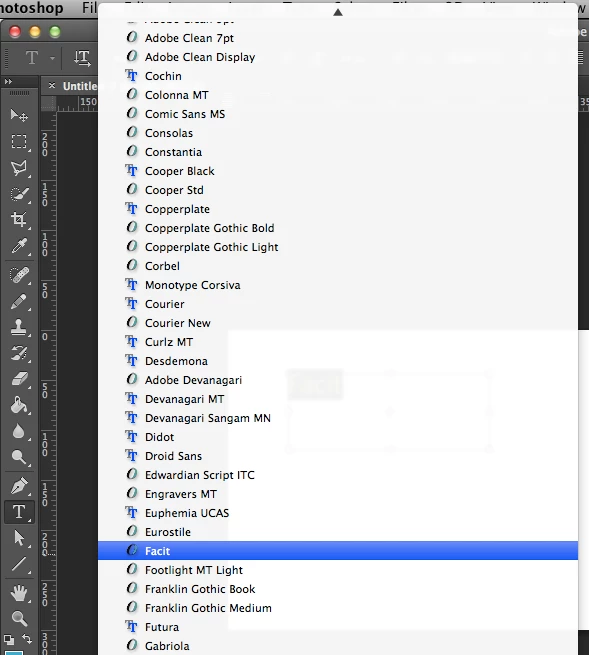
JAF Facit is listed as "Facit" in Creative Cloud apps; see the below screenshot from Photoshop CC. Would you check and see if the font is listed there for you as well?

Please let me know if the font isn't listed as "Facit" for you either, and we can look into it further! Typekit is also working on ways to make these cases easier to find in the future.  Best,

-- liz

1 reply

liz, Adobe Type
Community Manager
liz, Adobe TypeCommunity ManagerCorrect answer
Community Manager
November 7, 2013

Hi Mark,

I'm sorry that you ran into trouble with this. Different applications may display the font name differently in the menu. If the font family includes the foundry in the name, such as JAF Facit, it will sometimes not be included. (If you'd like to read more about this, there is a help page "Why isn’t the Typekit font added to the font menu?")

JAF Facit is listed as "Facit" in Creative Cloud apps; see the below screenshot from Photoshop CC. Would you check and see if the font is listed there for you as well?

Please let me know if the font isn't listed as "Facit" for you either, and we can look into it further! Typekit is also working on ways to make these cases easier to find in the future.  Best,

-- liz

Participant
November 8, 2013

Thank you for your help and answer.

I could found it as "Facit" now.

I will check it next time again also under the second name.

Thanks. Best regards

Mark