Participating Frequently
August 5, 2017
Answered

Typekit Fonts No Longer Syncing with InDesign CC 2017

  • August 5, 2017
  • 4 replies
  • 2451 views

I have been through a couple different Adobe Techs and they are trying to research the problem for me.

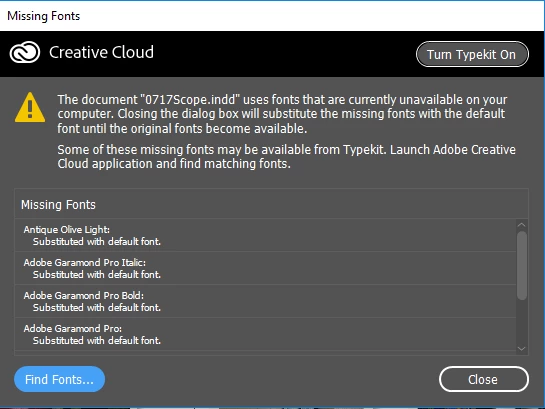
I have the latest and greatest version of InDesign CC as well as Creative Cloud installed.  I also do not have any Typekit Fonts in the Windows Font directory as one of the other posts had mentioned.  One image shows what I get when I open up an existing document.  The other image is of the Creative Cloud app, under the Assets area.  Notice it does not say "Sync Fonts from Typekit" or "Manage Fonts" like most of images I have found online say.

When I hit the "Turn Typekit On" button, nothing happens.

Has anybody had this same issue??

Thank you,

Chris
This topic has been closed for replies.
Correct answer Ramesh_Encore

Hello Ramesh,

I still have problems with Creative Cloud working. I sent log files that

one of the Adobe technicians had requested a few weeks ago, but haven't

heard anything since. Then my original post was moved to a new forum.

I have been using Windows Defender on my Windows 10 64-bit system to date.

I have had it disabled when installing Creative Cloud.

The version of Core Sync is 2.4.2.61.

I always run my Adobe products as Administrator.

I hope this is what you need to help me take care of this once and for all.

Thank you,

Chris

On Tue, Sep 5, 2017 at 1:03 AM, Ramesh_Encore <forums_noreply@adobe.com>


Hi Chris,

It all points to a problem where I think your CoreSync.exe process is not running and that is the reason your Assets and Fonts panel are shown blank and not working.

If you can confirm that your CoreSync.exe process is indeed running then I might think of possible solution to this problem.

Regards,

Ramesh.

4 replies

jane-e
Community Expert
Community Expert
August 5, 2017

Is Creative Cloud hung up on the most recent update? Can you click on any other tabs in the Creative Cloud application?

If it is hung up, look to see if Windows is waiting for your permission to make changes to the program.

Participating Frequently
August 5, 2017

Hello Jane-e,

No, the CC app is not hung up or waiting for my input on something.  I can click on all other tabs, including Home, Apps, Stock, and Community.  Under Assets, I can click on Market, but both Fonts and Files have the same spinning hour-glass as shown in the image above.

I am running the CC app as an Administrator, so it shouldn't be an issue of needing admin rights to run.

Thanks,

Chris

jane-e
Community Expert
Community Expert
August 6, 2017

Okay, I saw this happen on Wednesday in a classroom, and the issue was that the Creative Cloud had to update, and the Windows permission was only showing in the task bar at the bottom. Saying yes, you have my permission and letting the Cloud app update turned Typekit on and synced the files. I was hoping it would help you as well!

(I am usually on a Mac where we don't go through this!)

Participating Frequently
August 5, 2017

Hi Steve,

Yes I have gone through each step of that already, including sending an email to the Typekit support address.  In Step 5, I am unable to select the radio button to turn off Typekit.  It is grayed out.  For step 7, I disabled my firewall which would allow all traffic in, but that didn't work either.  I don't believe it is a firewall issue because it has been working all along for the last several years.  So I really don't know what to think right now.

Thank you.

Steve Werner
Community Expert
Community Expert
August 5, 2017

Here's a guide to troubleshooting type syncing problems with Typekit:

Troubleshoot font syncing problems in Typekit

Participating Frequently
August 5, 2017

Hi Steve,

Yes I have gone through each step of that already, including sending an email to the Typekit support address.  In Step 5, I am unable to select the radio button to turn off Typekit.  It is grayed out.  For step 7, I disabled my firewall which would allow all traffic in, but that didn't work either.  I don't believe it is a firewall issue because it has been working all along for the last several years.  So I really don't know what to think right now.

Thank you.

kglad
Community Expert
Community Expert
August 5, 2017