Participant
April 29, 2015
Answered

Unable to create the creative cloud files folder.

  • April 29, 2015
  • 5 replies
  • 8694 views

I get this message when I try to sync files to Creative Cloud folder:
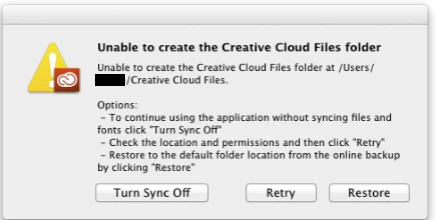
I have tried the options, and to close the program and restart the computer, but no luck.

This topic has been closed for replies.
Correct answer IvanoTls

I have got the same issue. SOLVED

Looking at the CoreSync-YYYY-MM-DD.log lines, I remarked messages about .db corruption in the CoreSync directory.

I solved renaming

  C:\Users\<user>\AppData\Roaming\Adobe\CoreSync

into

  C:\Users\<user>\AppData\Roaming\Adobe\CoreSync.old

Before to rename you have to be sure that the Creative Cloud application is not running.

So,  unset the option 'Start at login' in the preferences, then longin again.

After login, rename, and then start the Creative Cloud Application manually.

The application creates a new CoreSync directory and it begins synchronizing !!!

If this work for you too, then you can remove safely the CoreSync.old directory.

Ivano.

------------------------------------------------------------------------------------------------------------------------

Window 8.1

Creative Cloud version 2.1.3.121

Photoshop CC 2015

5 replies

IvanoTlsCorrect answer
Inspiring
July 23, 2015

I have got the same issue. SOLVED

Looking at the CoreSync-YYYY-MM-DD.log lines, I remarked messages about .db corruption in the CoreSync directory.

I solved renaming

  C:\Users\<user>\AppData\Roaming\Adobe\CoreSync

into

  C:\Users\<user>\AppData\Roaming\Adobe\CoreSync.old

Before to rename you have to be sure that the Creative Cloud application is not running.

So,  unset the option 'Start at login' in the preferences, then longin again.

After login, rename, and then start the Creative Cloud Application manually.

The application creates a new CoreSync directory and it begins synchronizing !!!

If this work for you too, then you can remove safely the CoreSync.old directory.

Ivano.

------------------------------------------------------------------------------------------------------------------------

Window 8.1

Creative Cloud version 2.1.3.121

Photoshop CC 2015

Participant
July 12, 2015

After the update, we are experiencing the same exact problem. I have checked permissions for the folders. I even gave all levels of users full control to the folders in the security settings. This is on Windows 7. We're in the middle of a big project with several collaborators and have been relying on the Cloud quite a bit. Thankfully we also have a nice big DropBox account. I'll send in a support request.

Community Manager
July 13, 2015

Hi branfordtv,

It would be great to get some more info, are you able to send us your log files as per Ben's reply to Helmut?

Warmest wishes,

Ashley

Participant
July 15, 2015

I just sent along a zip file with the contents of the coresync folder to Ben.

helmutsteiner
Inspiring
July 8, 2015

Hi,
After the latest Creative Cloud Update (Version 2.1.3.121 released on 7/7/2015) I got the same issue. Everything was working fine before but the update completely broke file synchronization. The folder permissions didn't change so I suggest there is a bug in the software... Any thoughts??

Kind regards,
Helmut

Community Manager
July 8, 2015

Helmut,

Could you send us your log files so that we can investigate further? Please zip up the entire 'CoreSync' folder at the location below and send it to me at syncforum-communication@adobe.com.

Mac:

/Users/<username>/Library/Application Support/Adobe/CoreSync

Windows:

C:\Users\<username>\AppData\Roaming\Adobe\CoreSync

'Library' on Mac and 'AppData' on Windows are both hidden folders. Please read these pages for help on showing these folders:

http://helpx.adobe.com/x-productkb/global/show-hidden-files-folders-extensions.html (Win)

https://helpx.adobe.com/x-productkb/global/access-hidden-user-library-files.html (Mac)

helmutsteiner
Inspiring
July 10, 2015

Okay... the latest update auto installed itself today on my laptop, too. AND: I get the same error there!! Shall I send you the log files from my laptop as well?
Kind regards,
Helmut

wharress
Community Manager
Community Manager
April 30, 2015

Hi,

This looks like Creative Cloud is unable to create the Creative Cloud folder is your user home folder, are you certain that this location is 100% writable? there are no permissions stopping programs writing to this location?, its unusual that your Creative Cloud folder is missing, you must have manually moved or deleted it.

Thanks

Warner

John T Smith
Community Expert
Community Expert
April 29, 2015

Since this is an open forum, not Adobe support... you need to contact Adobe staff to help

Adobe contact information - http://helpx.adobe.com/contact.html

-Select your product and what you need help with

-Click on the blue box "Still need help? Contact us"