Participating Frequently
September 9, 2021
Question

Unable to install Adobe Apps in my laptop

  • September 9, 2021
  • 1 reply
  • 1301 views

Hi, 

I am Chirag Nahata.

Issue : Unable to install Adobe Apps in my laptop

Description : I am trying to install Adobe Services applications like Photoshop 2021 version in my Laptop.

Laptop Description : Laptop Model - Asus Vivobook 15 X512DA - EJ503T.

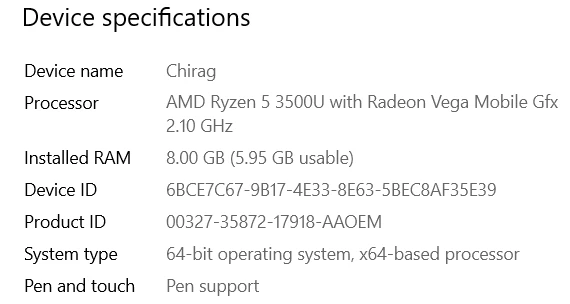
                                  Laptop Specifications

Device name Chirag
Processor AMD Ryzen 5 3500U with Radeon Vega Mobile Gfx 2.10 GHz
Installed RAM 8.00 GB (5.95 GB usable)
Device ID 6BCE7C67-9B17-4E33-8E63-5BEC8AF35E39
Product ID 00327-35872-17918-AAOEM
System type 64-bit operating system, x64-based processor
Pen and touch Pen support

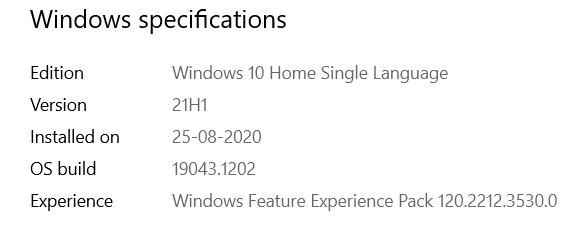
Edition Windows 10 Home Single Language
Version 21H1
Installed on ‎25-‎08-‎2020
OS build 19043.1202
Experience Windows Feature Experience Pack 120.2212.3530.0

This topic has been closed for replies.

1 reply

LinSims
Community Expert
Community Expert
September 9, 2021

What happens when you try to install it? Does the Creative Cloud desktop give you any error messages?

Participating Frequently
September 9, 2021

Yes, while installing just a blank setup page appears. I have attached a screenshot. Please find the attachment.


Jeffrey_A_Wright
Community Manager
Community Manager
September 9, 2021

Chirag, what Adobe application or service are you trying to install? I do not see any active memberships under the e-mail address you used to post to this public discussion forum.


If you are attempting to install Adobe applications included with a Creative Cloud membership, please check the log files for the errors preventing the installation from completing. Information on how to discover these errors can be found at https://helpx.adobe.com/download-install/kb/find-installation-log-files.html.