
Participant
September 12, 2022
Question

unable to repair ColoProfiles in MacOs Cataline ColorSync Utility

  • September 12, 2022
  • 2 replies
  • 180 views

This may be relevant to the Adobe Acrobat Pro DC Version 2022 002.20212 which I have been using for about 2 years. But I suspect it may have more to do with Creative Cloud, which I signed up for a free trial, and then cancelled, and uninstalled - I'm never going to need it.  
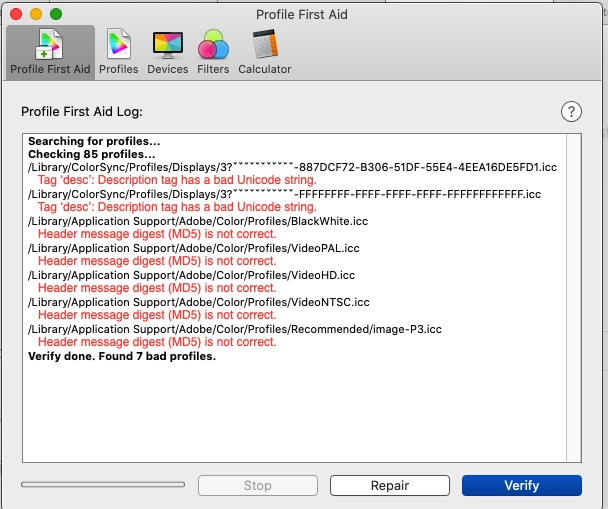
I would be very grateful for any advice, how to remove these errors. Or remove the profiles, if I don't need them.

This topic has been closed for replies.

2 replies

Peru Bob
Community Expert
Community Expert
September 12, 2022
Participant
September 12, 2022

Thank you for your response.

I have duly followed the instructions to use the cleaner tool.

Now, I no longer have access to my Adobe Acrobat Pro DC application, and
the ColorSync Utility still has the corrupted filed.

Any more suggestions? I'd be most grateful
Kind regards
Flloyd

[Personal information removed by moderator.]

LinSims
Community Expert
Community Expert
September 12, 2022

Please let us know which program you are having problems with. Someone will be along to move this post to the appropriate product forum, where you are more likely to get an answer to your question.

The Using the Community forum is for help in using the Adobe Support Community forums, not for help with specific programs, installation issues, or account issues such as subscription questions or billing problems, or generalized questions about Creative Cloud services.

* Product questions should be posted in the associated product community.
* Installation questions should be posted in the Download & Install community.
* Account issues, including subscription questions or billing problems, should be posted in the Account, Payment, & Plan community.
* Questions about the Creative Cloud desktop app or general questions about apps in the Creative Cloud should be posted to the Creative Cloud Services community.