
jacksng
Participant
March 28, 2017
Question

Unable to Sync due to server error

  • March 28, 2017
  • 1 reply
  • 622 views

Hi there,

I have been having problems with syncing files in my Creative Clouds.

I am using an iMac (OS X Ver 10.11.6)  and MacPro (OX 10.11.5) and I am on Creative Cloud 4.0.0.185 

1. The files that wouldn't Sync "due to server error" were deleted from my Creative Cloud folder on both my iMac and MacPro

2. The files were also deleted under "All" and "Archived: online at https://assets.adobe.com/

3. These files were personal files I used at work. They are not public.

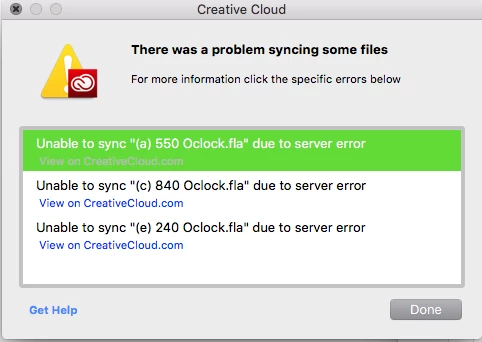
4. Despite the aforementioned, I am still receiving notification for "There was a problem syncing some files." (See attached picture below)

Question:

A. What is wrong with Creative Cloud?

B. What can I do to solve this.

I hope some one will get back to me regarding this asap.

Thanks.
This topic has been closed for replies.

1 reply

David__B
Adobe Employee
Adobe Employee
March 29, 2017

Hi Jacksng,

Are the .fla files in the error dialogue in folders ones which you've collaborated with others on in the past? Are they in folders which appear here? Adobe Creative Cloud

I've seen some recent reports of this when you shared the folder containing the files with another user and that other user ran out of space. When that happens, everyone who the folder was shared with loses access, and can get server errors like this. I'm not sure if that is the case here but that has been a common cause in many other past cases.

Please get back to me when you have time,

Thanks,

- Dave

jacksng
jacksngAuthor
Participant
March 29, 2017

Hi Dave,

Thanks for your reply.

To answer your question:

No. The .fla files in the error dialogue were always personal.

They were never shared, and never used collaboration with others in the past.

Any idea why this is happening?

Thanks!

Jack

David__B
Adobe Employee
Adobe Employee
March 29, 2017

Thanks for the info Jack,

Would you mind collecting log files from your system which I could pass on to our engineering to help investigate this issue?

To collect the log files download the log collection tool from here:

https://helpx.adobe.com/creative-cloud/kb/cc-log-collector.html

After you running it it will create a .zip file on your desktop of all of the log files from your system. If you could upload and share a link with me on where to download the .zip from, I'll pass it on to our engineering dept to review. You can send the link privately by clicking on my name here in the forums and select the message option.

Engineering may have some additional questions but this will help us get started.

Thanks,

- Dave

.