Participant
January 14, 2017
Question

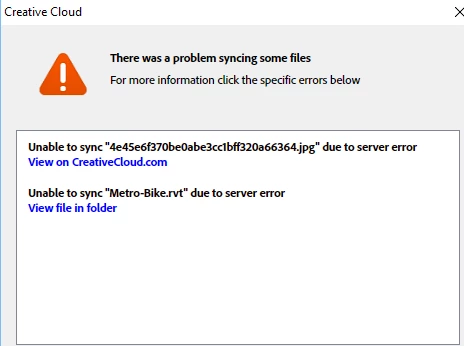
Unable to Sync due to server error

  • January 14, 2017
  • 3 replies
  • 1163 views

Hi,

I can't sync to creative cloud and i keep receiving this message " Unable to Sync < file> due to server error". i am running a single user account and works on one PC. appreciate your help.

Thanks
This topic has been closed for replies.

3 replies

Participating Frequently
February 8, 2017

Before you go troubleshooting all the steps linked to (although given the date, it may be too late) You may want to try logging into your Adobe CC account in a browser, View your Archived files, and delete the troublesome files from your archives.

I've run into the same problem you're having. I did what I described above and it seemed to do the trick. The effects aren't immediate. It's going to take a day or so for Adobe to catch up but the warning should go away.

Although this worked for me, just today, a new file has given me the same problem. After my fix, we'll see if the warning dialog goes away tomorrow.

Kanikas
Community Manager
Community Manager
January 16, 2017
kglad
Community Expert
Community Expert
January 14, 2017

confirm that you can connect to the secure adobe servers.

for help with that and other common secure adobe.com connection problems read, http://helpx.adobe.com/x-productkb/policy-pricing/activation-network-issues.html

after doing that, if the problem persists, Error: "Unable to sync files" to the Adobe Creative Cloud
