
Participant
November 17, 2015
Question

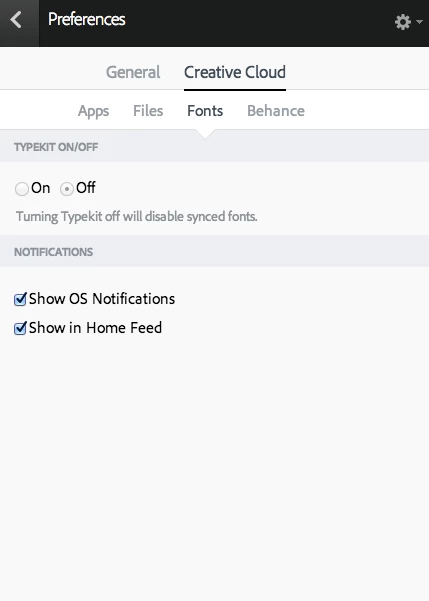
unable to "turn on" typekit to sync fonts in creative cloud

  • November 17, 2015
  • 1 reply
  • 1136 views

Fonts are synced in my creative cloud desktop app but aren't loading into my program or showing up in the app.

Also, can't "turn on" typekit to sync fonts (attached is a screen shot). I think that might be the problem but I don't know why it won't let me click to "on". Any help is appreciated!!
This topic has been closed for replies.

1 reply

Pattie-F
Legend
November 17, 2015

I am moving the discussion to File Hosting, Syncing, and Collaboration forum for assistance.

You can also ask Typekit questions here: Adobe Typekit Help center or the TypeKit support is available via email "support@typekit.com" and on twitter @Typekit.

related links:

Creative Cloud fonts, installation, FAQ | Adobe

Creative Cloud Help | Add fonts from Typekit