
karensatiro
Participant
September 15, 2015
Question

Upload PSD file to Creative Cloud. ERROR!

  • September 15, 2015
  • 2 replies
  • 895 views

Hi everybody,

I've got a little problem with File Uploading to Creative Cloud. I've tried upload a Photoshop File with 6,8MB size and I've got 2 feedback messages:

1º: Everything is OK, is a MacOS notification:

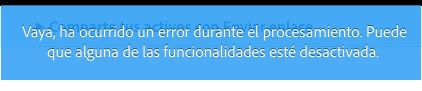
2º: ERROR! Navigate within Creative Cloud Web Platform they send me a error message:

"Wow, an error occurred while processing. Maybe some of the functionality is disabled."

(spanish version)
Anyone knows what can it be? I have to send the PSD Extract to a Front-End Developer and I'm feel in a big trouble.

Thanks!!

Karen Sátiro

This topic has been closed for replies.

2 replies

Ken G. Rice
Participating Frequently
September 15, 2015

@karensatiro - The file upload succeeded. You can share the file with the front-end developer.

The error you are seeing is just with the Extract feature. Please use Send Link to share the file with me via a forum Private Message or email me at kenrice@adobe.com. We will investigate the problem.

karensatiro
Participant
September 16, 2015

Hi Ken, thanks for the quick answer.

I share the file via Send Link using your email. I'll be waiting for your contact.


Thanks again.

karensatiro
Participant
September 16, 2015

Hi Ken.. the Front-end developer can't access to the file in the cloud.

I really in a bad situation here.

There are any alternative to work with him without PSD Extracts or Cloud Services like a Brackets+Photoshop integration?

Thank you again,

Regards,

Karen Sátiro

Atul_Saini
Legend
September 15, 2015