Participant
June 25, 2020
Question

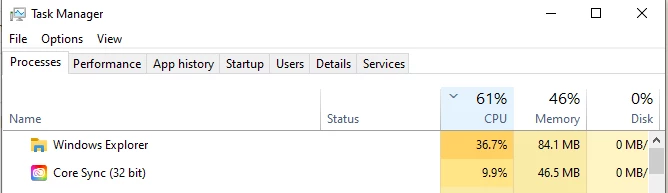
Whenever I turn on file syncing, cpu usage of explorer.exe skyrockets

  • June 25, 2020
  • 1 reply
  • 264 views

File Sync Enabled:


If I open file explorer it's just too slow to load anything

 

I stop file sync and kill coresync.exe it goes back to normal, explorer.exe doesn't spend even 1% cpu and I can use file explorer just fine.

This topic has been closed for replies.

1 reply

Adobe Employee
June 26, 2020

Hello felipejfc, 

I would imagine that there would be some increase in CPU usage for Explorer as CoreSync tries to establish a connection with servers (via Operating System) and does the hand-shake. There are a few other things which happen in the background around validating authenticity etc. But after this initial chatter, the CPU usage for Explorer should settle down.


I would be interested in knowing more on what happens, say after 10 minutes of re-starting the Sync. Thanks much.


Kindly,

Nandan