
Participant
June 11, 2021
Answered

Where is the "Cloud documents" tab that used to be found under "Your work"

  • June 11, 2021
  • 1 reply
  • 338 views

I can't find or browse my cloud documents, missing the "Cloud documents" tab that used to be under "Your work" section next to libraries. How can I access the list of my cloud documents without searching them manually? Very distressing...
This topic has been closed for replies.
Correct answer kglad

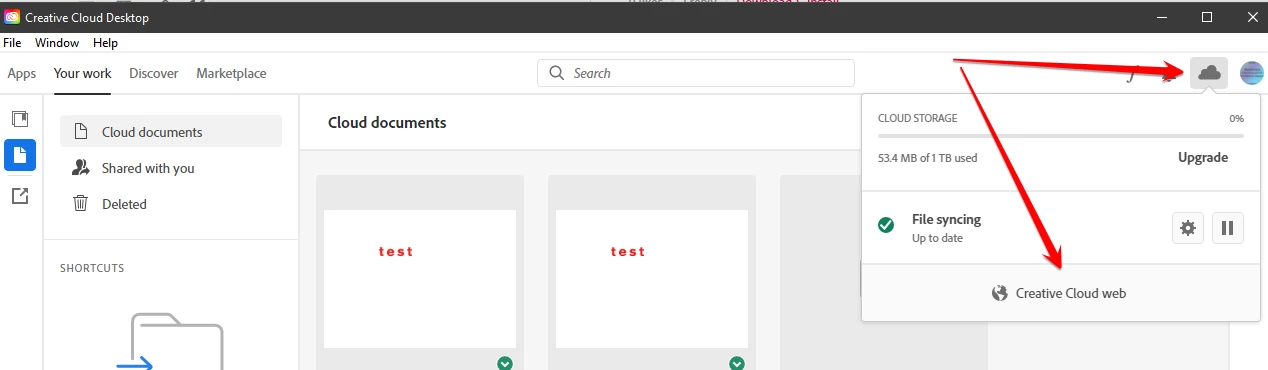
1. you could go to your cc web files


2. you could try fixing your cc app: first, reset the cc app:

to reset the cc desktop app, make sure it's in the foreground, then press:

Win: Ctrl + Alt + R
Mac: Cmd + Opt + R

if that fails, try to repair
https://helpx.adobe.com/download-install/kb/creative-cloud-install-stuck.html

if that fails go ahead and uninstall/reinstall per the above link

if that fails, do a clean cc install following each applicable step:

uninstall every cc app including preferences, https://helpx.adobe.com/creative-cloud/help/uninstall-remove-app.html
then uninstall the cc desktop app, https://helpx.adobe.com/creative-cloud/help/uninstall-creative-cloud-desktop-app.html
clean your computer of cc files per http://www.adobe.com/support/contact/cscleanertool.html
check for, and if available, update your os
repair all ms visual c++ versions that can be repaired.
update your ms visual c++, if it can be updated
restart your computer (don't skip this)
reinstall the cc desktop app, https://creativecloud.adobe.com/apps/all/desktop?action=install&source=apps&productId=creative-cloud
if you're unable to install the cc desktop app at this stage, use the link at the bottom of the page at https://helpx.adobe.com/download-install/kb/creative-cloud-desktop-app-download.html
use the desktop app to install your cc programs/trials


1 reply

kglad
Community Expert
kgladCommunity ExpertCorrect answer
Community Expert
June 11, 2021

1. you could go to your cc web files


2. you could try fixing your cc app: first, reset the cc app:

to reset the cc desktop app, make sure it's in the foreground, then press:

Win: Ctrl + Alt + R
Mac: Cmd + Opt + R

if that fails, try to repair
https://helpx.adobe.com/download-install/kb/creative-cloud-install-stuck.html

if that fails go ahead and uninstall/reinstall per the above link

if that fails, do a clean cc install following each applicable step:

uninstall every cc app including preferences, https://helpx.adobe.com/creative-cloud/help/uninstall-remove-app.html
then uninstall the cc desktop app, https://helpx.adobe.com/creative-cloud/help/uninstall-creative-cloud-desktop-app.html
clean your computer of cc files per http://www.adobe.com/support/contact/cscleanertool.html
check for, and if available, update your os
repair all ms visual c++ versions that can be repaired.
update your ms visual c++, if it can be updated
restart your computer (don't skip this)
reinstall the cc desktop app, https://creativecloud.adobe.com/apps/all/desktop?action=install&source=apps&productId=creative-cloud
if you're unable to install the cc desktop app at this stage, use the link at the bottom of the page at https://helpx.adobe.com/download-install/kb/creative-cloud-desktop-app-download.html
use the desktop app to install your cc programs/trials