


Participant
Apr 19, 2021 2:58 PM UTC
Answered

Why does my monitor display look like this in all Adobe programs:

Warum sieht meine Monitoranzeige in allen Adobe-Programmen so aus:
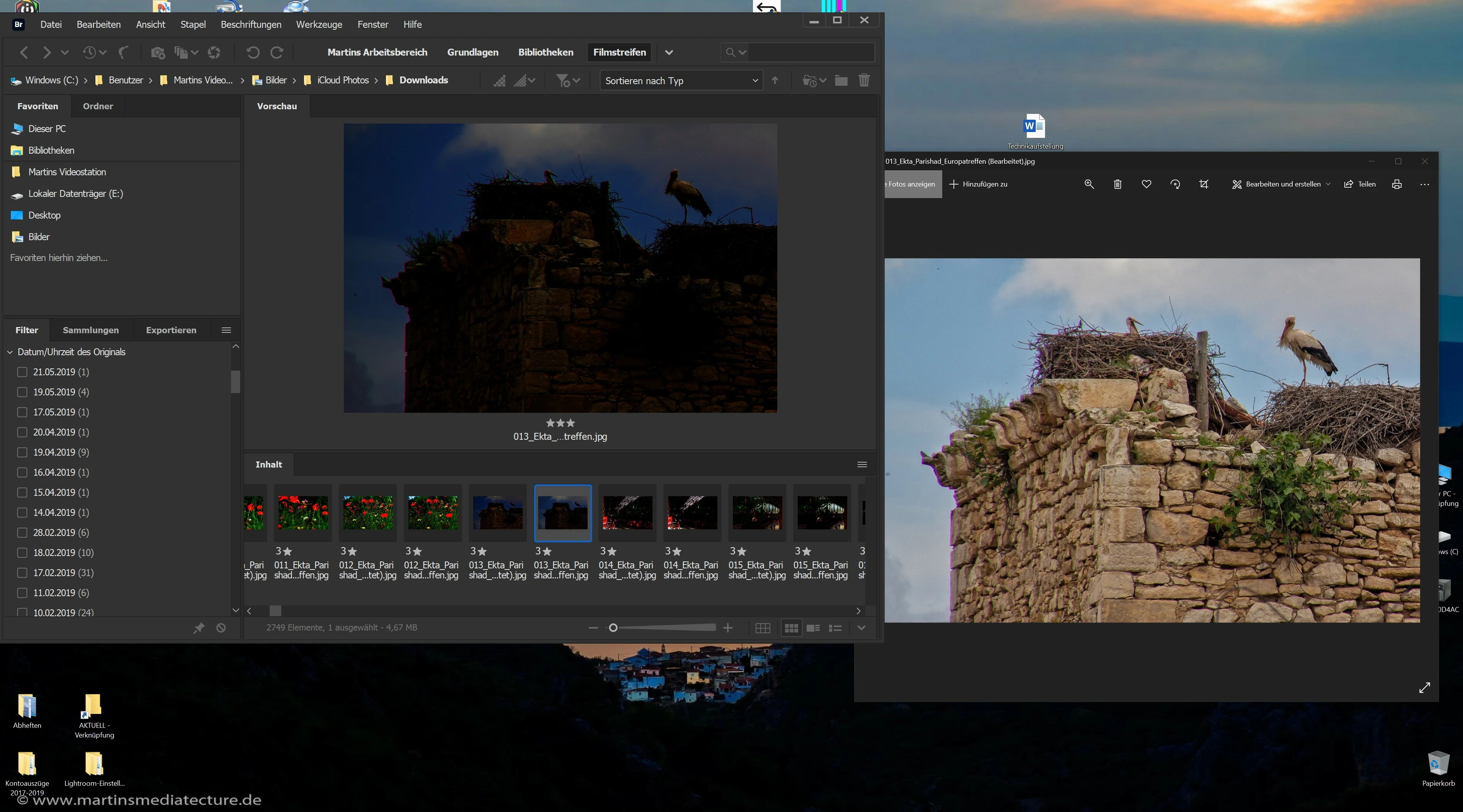
In allen anderen Bildbetrachtungsprogrammen auf meinem Windows-Computer werden meine Bilder korrekt dargestellt (siehe rechte Seite des Screenshots). Welche Einstellungen muss ich für alle von mir verwendet Adobe Programme ändern, um dies auch mit Adobe auf meinem Windows-Computer - bei Apple-Computer tritt dieses Problem nicht auf - zu erreichen? Meine wichtigsten Programme sind: Premiere, Photoshop, Lightroom und Bridge.
Vielen Dank für Eure Hilfe,
Martin


This topic is closed to new replies. Start a new post to keep the conversation going.
Martin 54Correct answer
Participant
May 4, 2021 5:36 PM UTC

Vielen Dank für eure Antworten und Unterstützung. Auf Eure Anregung hin, habe ich alle Grafiktreiber neu aufgespielt. Keine Lösung, da alle Treiber auf dem aktuellen Stand waren. Danach habe ich alle Eingänge in den Monitor getestet – auch keine Lösung. Darum habe ich alle Kabel erneuert und alles funktioniert wieder. Dies ist mir unerklärlich, denn die Kabel sind fest verbaut und müssen von alleine (nach 5 Jahren der Nutzung) defekt sein. Nun funktioniert alles wieder und ich kann wieder arbeiten und bin glücklich, auch wenn ich mir das Problem nicht verständlich ist.

5 replies

Nancy OShea
Community Expert
Community Expert
Apr 19, 2021 8:33 PM UTC

Looks like a GPU problem. When was the last time you updated graphics drivers from your card manufacturer's website?


Translate
Nancy O'Shea— Product User & Community Expert
Martin 54AuthorCorrect answer
Participant
May 4, 2021 5:36 PM UTC

Vielen Dank für eure Antworten und Unterstützung. Auf Eure Anregung hin, habe ich alle Grafiktreiber neu aufgespielt. Keine Lösung, da alle Treiber auf dem aktuellen Stand waren. Danach habe ich alle Eingänge in den Monitor getestet – auch keine Lösung. Darum habe ich alle Kabel erneuert und alles funktioniert wieder. Dies ist mir unerklärlich, denn die Kabel sind fest verbaut und müssen von alleine (nach 5 Jahren der Nutzung) defekt sein. Nun funktioniert alles wieder und ich kann wieder arbeiten und bin glücklich, auch wenn ich mir das Problem nicht verständlich ist.

Translate
Nancy OShea
Community Expert
Community Expert
May 4, 2021 5:50 PM UTC

It's good to know you were able to fix the problem. 

It's not uncommon for connection cables to wear out from continued use.  That's why stores carry replacements.  😉


Translate
Nancy O'Shea— Product User & Community Expert
John T Smith
Community Expert
Community Expert
Apr 19, 2021 6:44 PM UTC

Do not count on Windows to be fully up to date when it comes to device drivers
Go to the vendor site to be sure you have an updated driver for your graphic adapter
•nVidia Driver Downloads http://www.nvidia.com/Download/index.aspx?lang=en-us
••for Premiere Pro and MAYBE Premiere Elements use the STUDIO driver, not the GAMING driver
•••such as (MAY not be the latest) https://www.nvidia.com/en-us/drivers/results/170344/
•ATI Driver https://www.amd.com/en/support
There are also intermittent reports that the newest driver is not always the best driver due to driver bugs or compatibility issues, so you MAY need to try an earlier driver version

Translate
LinSims
Community Expert
Community Expert
Apr 19, 2021 3:42 PM UTC

Let me move this to the Creative Cloud Services forum for you, which covers issues that affect all of Adobe's Creative Cloud Services.

The Using the Community forum is for help in using the Adobe Support Community forums, not for help with specific programs. Product questions should be posted in the associated product community.

Translate