F.Quill
Inspiring
March 2, 2021
Answered

Why is Adobe CC "Unable to reach Adobe servers"

  • March 2, 2021
  • 1 reply
  • 2006 views

Just started doing this, tonight.   ... ? for no reason ...  Weirdly suspicious, and ex-annoying.

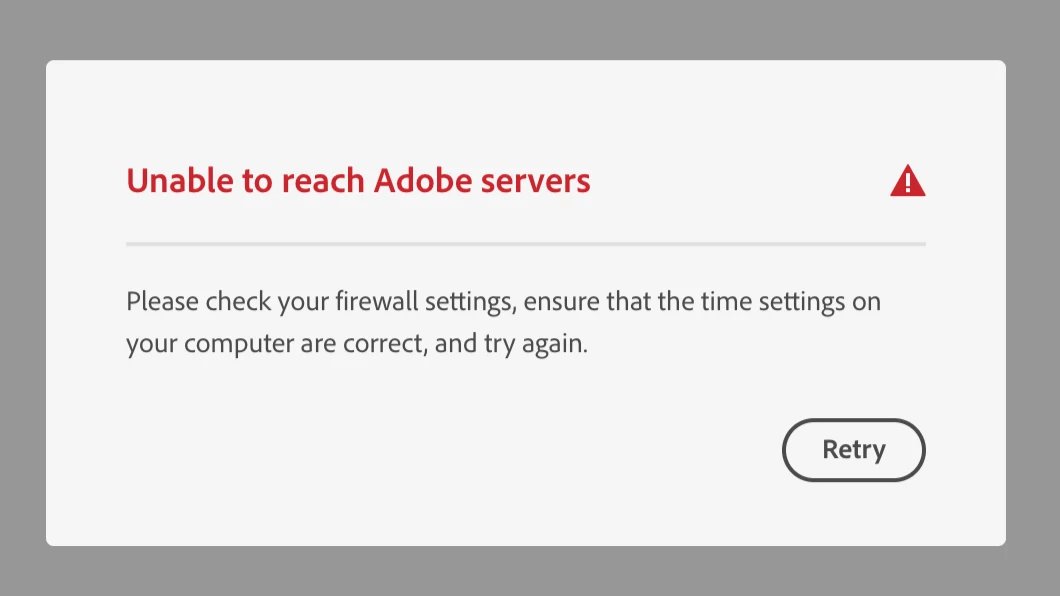
"Unable to reach Adobe servers"  (see screencap below)

Firewall settings are not changed, and I have no idea what it means about time settings?  

And I was able to get the CC window to pop-up for a second and when I clicked on the community it crashed again.

Signed in from my browser - to Adobe and their Adobe Creative Cloud "contact" button for support does not work, on their page, either.

My account is in good standing.

What is best action recommended?


macOS Catalina, v10.15.7  Adobe CC Member 4 years approx.


    This topic has been closed for replies.
    Correct answer kglad

    Thank-you, kglad!

    Timing is everything!  The Creative Cloud is updated, now, to V 5.4.1.534 (did it in the bg) and all apps seem to be working off-line and on-line.


    There is an issue with the time-zone on my OS (maybe because of Daylight-Savings-Time (DST), here).  Am going to ignore that, for now.  It will go away in a few weeks when our clocks change. (DST is a complete WASTE of time and energy at every level but some silly folks where I live want it to be on forever - it should be OFF forever.)


    Also there is an issue with the 'syncing' that is paused, now.  Still cannot find any place where I can disallow or stop the sync process.  That is a new, odd, and undesired behaviour.  Will explore and learn more about as it applies with the Apps I use most, later.  Suspect it may have to do with some Presets.  That is a different topic, tho.


    Thank-you for the link to the network issue page!  Excellent resource that I will study, today.  At a glance, there are a few topics there that need my attention to learn more.


    But I think I am good to go, for now.  So thanks, again, for your valued input.  Adobe Community Pros are my heros!  


    Have a wonderful day!


    sync pause is the same as stop.  it should remain "paused" with computer restarts and adobe cc app updates.


    the only thing that should cause sync to unpause/restart would be if you manually click "resume syncing" in the preferences>syncing panel


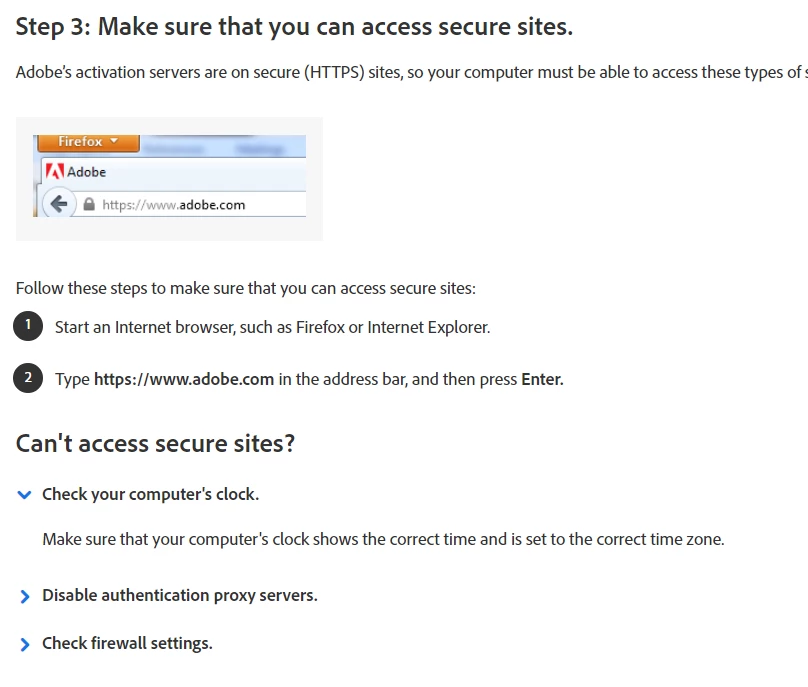
    your system clock can be an issue causing connection problems.  i have no idea why that should be so, but check step3, #2 on the network issue link:


    1 reply

    kglad
    Community Expert
    Community Expert
    March 2, 2021

    adobe's website is having problems.  many of us are seeing issues with signing-in, accessing cloud files etc.


    what are you doing that triggers that message?

    F.Quill
    F.QuillAuthor
    Inspiring
    March 3, 2021

    Apologies for late reply - out all day.  The message (screenshot) that I posted above is what shows when I click on my Adobe Creative Cloud (symbol on my top bar on my iMac).

    This is what I get when I try to open PS (or InDesign).

    I even tried opening an older version of PS and same pop-up blocks me.  When I close the pop-up I cannot use PS - it just closes - same with InDesign.  I won't bother opening LR because it will make me sick to my stomach if it doesn't work (or worse - crashes, ... ).

    Did get to talk to Adobe support - chat on-line - briefly, last night, but was so late that I could not continue.  I will call back, this evening.  

    This is really hard - can't even use any of my applications to get some work done.


    Would that I did a big housekeeping back-up, check & clean-up all drives, and review TM & TC back-ups for two iMacs (one is an older one that is no longer used for any Adobe applications - computer is just too old), & reviewed wi-fi/ internet upload/download speeds etc., all successfully completed just prior to this event, possibly have had anything to do with this?  Nothing major changed but did notice that an old version of Adobe CC was purged (v 2019).  

    I was able to sign-in to my account from my browser and checked on my account standing.  Everything looks fine but I did notice that the time-zone was one zone west so I corrected that - that's the only "time settings" I could find or think of.  Everything on this computer is A-OK!

    I am never the smartest UI or OS person in the room - not even close: that makes me pay close attention, though.

    So I really I do appreciate guidance.

    As it stands, in this moment, I cannot do ANY work with ANY Adobe product. 

    Yikes!