
Participant
December 3, 2020
Question

Why is Creative Cloud showing banners in French not English?

  • December 3, 2020
  • 1 reply
  • 287 views

Creative Cloud Desktop and the Creative Cloud web page is showing banners at the top in French with links to the French website for Adobe. 


Why?


If you go to this web page: https://creativecloud.adobe.com/apps/all/desktop


This is what you see - everything in English except the banner
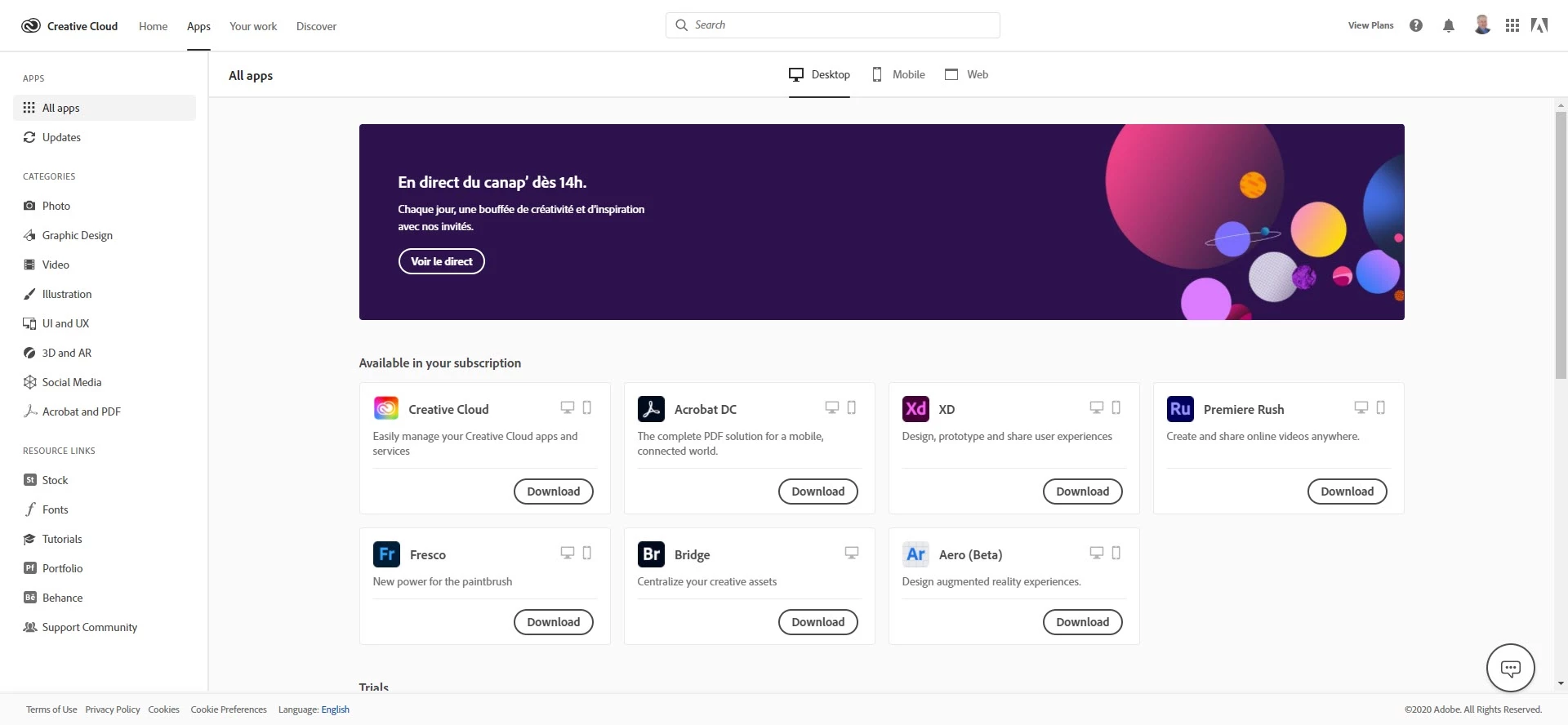


I have uninstalled and reinstalled, removed all cookies and all cache, but the issue persists.


Adobe Technical Support cannot work it out either.


Any ideas?

This topic has been closed for replies.

1 reply

kglad
Community Expert
Community Expert
December 3, 2020

one of these probably needs to be changed:


change adobe.com website language - https://forums.adobe.com/thread/1999693


change country associated with adobe id - https://helpx.adobe.com/x-productkb/policy-pricing/change-country-associated-with-adobe-id.html


change currency - https://forums.adobe.com/thread/1999694


change store - http://www.adobe.com/store_selector/storeselector.html

Participant
December 3, 2020

Thanks for the suggestions - but everything is set to English.

The country is set to UK, the currency is set to GBP, the store is set to UK, the website language is English.

All cookies and caches have been deleted. Everything re-set to all the English versions.

Everything on Creative Cloud is in English EXCEPT the banner at the top which is French...!

Having checked on Google quickly, other people have reported this back in 2015...!

kglad
Community Expert
Community Expert
December 3, 2020

then i think this is in the category of, leave well enough alone.