
Inspiring
July 18, 2023
Answered

XD files not syncing in Creative Cloud
  • July 18, 2023
  • 1 reply
  • 465 views

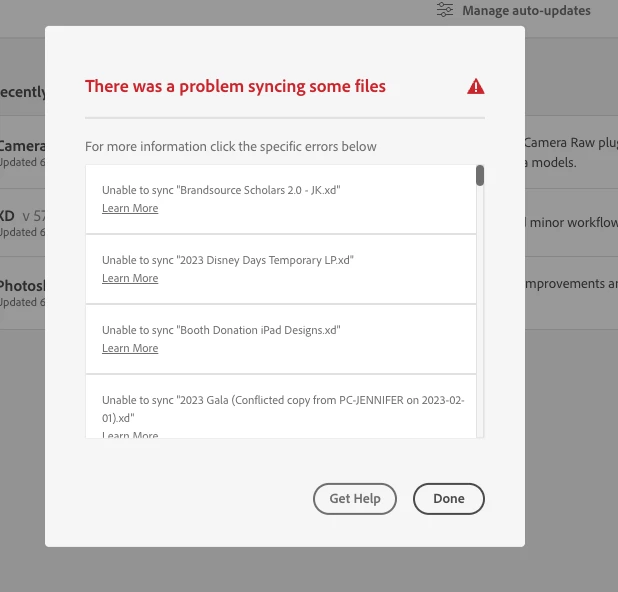
I'm trying to sync in Adobe Creative Cloud, but for some strange reason I'm getting this error saying some files could not sync, strangely, only the XD files are not syncing and if I go to the Creative Cloud folder it shows that is synchronizing but in the end all XD files or recently shared folders are not there. I have tried different things I found in this forum but nothing worked, I uninstalled CC and install again, I have killed all CC processes and relaunch, I have signed out and sign back in, nothing has fixed the issue.


This topic has been closed for replies.
Correct answer Ricardo302194373oz1

that formatting is ok. 


see if there's anything here that helps, https://helpx.adobe.com/lv/creative-cloud/kb/fix-sync-issues-macos.html


I was able to fix it, the folder was a shared folder for a work group, so I left the group and got invited again, I deleted the CC folder and now it's working fine

1 reply

kglad
Community Expert
Community Expert
July 18, 2023

are you saving/moving xd files to your local sync folder?

Inspiring
July 18, 2023

I had it stored in my mac but since the storage in my laptop is almost full I moved the location to an external hard drive, first I tried setting it to a google drive and I was getting the same error, so is there any particular procedure to follow if I want to do this?

kglad
Community Expert
Community Expert
July 18, 2023

adobe's sync stores files locally and on their cloud servers. ie, you can't save on cloud only with adobe. you can with other cloud storage solutions.