Participant
February 19, 2015
Answered

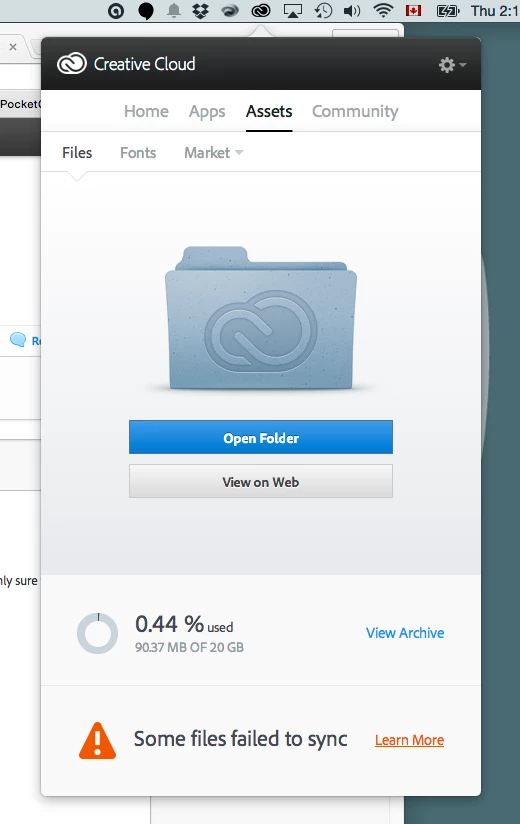
Zero files in the cloud yet "Some Files Failed to Sync"

  • February 19, 2015
  • 1 reply
  • 943 views

I have zero files in the cloud at the moment, and yet get the "Some Files Failed to Sync" when switching WiFI. (Yosemite, MBP 2014)

This most often happens when i switch to a public wi-fi such as the Starbucks, where I'm required to "Accept the terms" on a webpage.

I'd love to use the cloud storage feature, but the constant synchronization issues make it extremely unreliable and I basically resort to dropbox.

Please advise.

This topic has been closed for replies.
Correct answer wharress

Wharress,

Firstly, throughout this whole experience I have been running Dropbox and iCloud on my computer and haven't seen a single error or bug. Therefore, in my opinion the problem is with Adobe's product. My provider, Bell Canada, doesn't block any of the Adobe servers. And, moreover, I would expect CC to be intelligent enough to simply go dormant when it cannot reach a server, not spew errors at me for which I (or even you) simply cannot do a thing.

Secondly, while checking the morning news on a stable home connection I received yet another error from CC. The computer was used for over 2 hours before the error appeared. Again, there are no files in the "Creative Cloud Files" folder short of the "Market Downloads" folder which my and Adobe Illustrator on my iPad generated.
You previously stated that the problem was with a font. Please follow up on that issue.

After all, I'm paying for this service and expect a reasonable amount of help from Adobe. Especially since it's been 2 months since the problem appeared and I simply cannot use the cloud storage.

Please advise.


Hi Edward,

I would like you to try this method to clear the errors you are seeing, since you have information that you are not blocked from your service provider.

Shift + Click on "View on Website" (Right click on any file within your Creative Cloud folder, then hold down Shift and click View on Website menu item)

This method will Force Sync to restart and will also clear the journal and errors table in the local database file.

Please let me know if this clears the errors you are seeing.

Thanks

Warner

1 reply

wharress
Participating Frequently
February 23, 2015

Hi,

This can happen for a number of reasons, however, public networks are the most unreliable wifi networks to use, and the error you are seeing will be shown for a reason. The only sure way to find out is to look into your logs files.


You can find them in the following locations:

Mac:

/Users/<username>/Library/Application Support/Adobe/CoreSync

Windows:

C:\Users\<username>\AppData\Roaming\Adobe\CoreSync

'Library' on Mac and 'AppData' on Windows are both hidden folders. Please read these pages for help on showing these folders:

http://helpx.adobe.com/x-productkb/global/show-hidden-files-folders-extensions.html (Win)

https://helpx.adobe.com/x-productkb/global/access-hidden-user-library-files.html (Mac)


Please send upload them to Creative Cloud and send me a link at harress@adobe.com


Thanks

Warner

arch1000Author
Participant
February 24, 2015

Hey,

Thanks for the response.

I'm not sure about pubic networks, but Today I simply closed the lid my MacBook Pro (Retina, 15-inch, Late 2013) carried it into a meeting, connected to my iPhone 5's tethered wi-fi connection and quickly got a network error on the CC's "Apps" page. After getting beck to my home Wifi, and clicking reload everything went back to normal.

Previously during one of those rigamarole procedures I suddenly stopped seeing Lightroom and had to reinstall it just to see it in the CC and being able to receive update notifications. Another time, CC suddenly started claiming that I have a font conflict with one of the weights of the Clavo font, which I synced via CC's Typekit, and after unlinking this particular weight from Typekit, I now apparently I "own" it on my computer.

Nonetheless, I've sent you 10 last days of log files to see if you can figure out what's happening here.

I really hope that the information that I’ve shared is anonymous. (oops :S)


Thanks for looking into this.


Sincerely,

E

wharress
Participating Frequently
February 24, 2015

Hi Edward,

I have looked over your log files and there seem to be issue with font sync rather than file sync, I have passed this on to my colleagues in TypeKit for investigation.

Thanks

Warner