

Question
中文字体显示错误
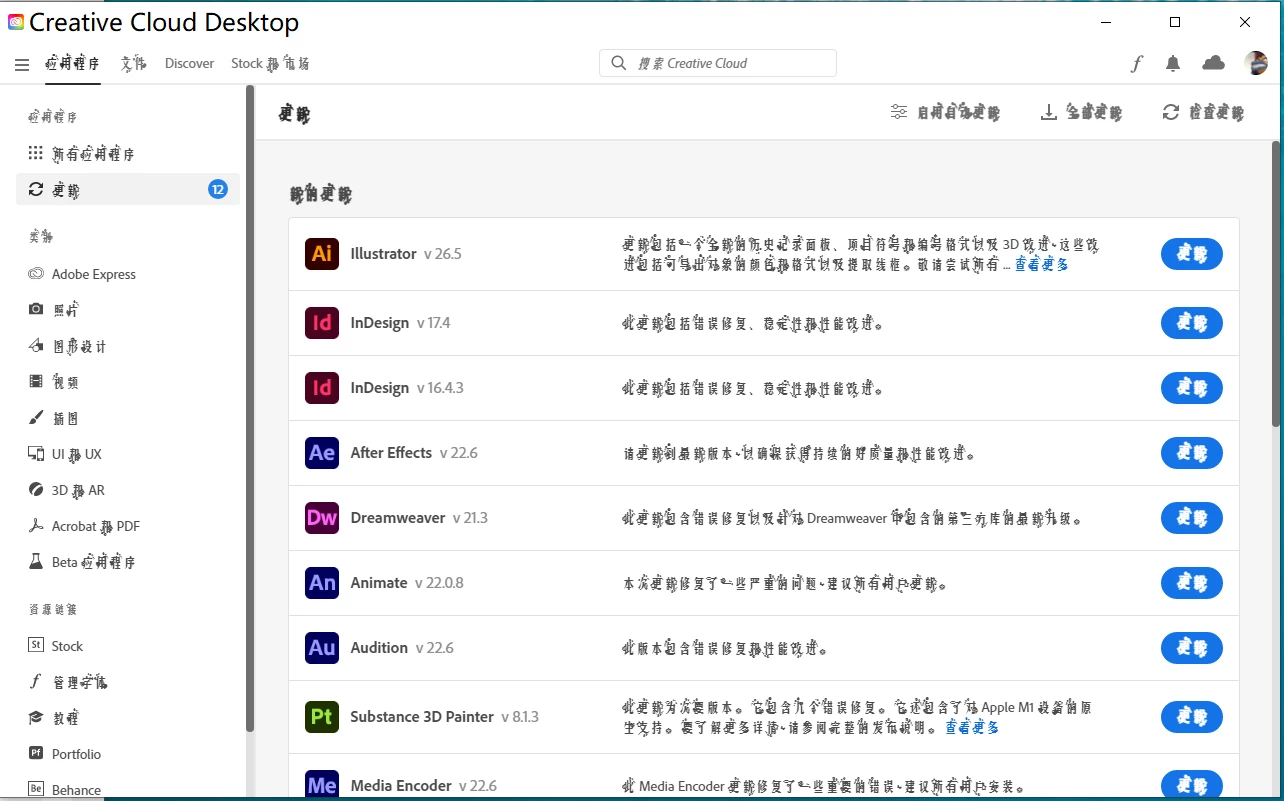
如图所示。当我更新了我的ps版本之后,adobe cloud的中文字体开始显示异常了。部分文字的周围出现破碎的,不规则的线条,就像是污渍一样。变得十分难以阅读。但是英文部分的显示却是正常的。我想知道这是什么情况?
另外,我想知道Adobe 系统中,操作界面的字体大小应该怎么调节?
谢谢帮助

如图所示。当我更新了我的ps版本之后,adobe cloud的中文字体开始显示异常了。部分文字的周围出现破碎的,不规则的线条,就像是污渍一样。变得十分难以阅读。但是英文部分的显示却是正常的。我想知道这是什么情况?
另外,我想知道Adobe 系统中,操作界面的字体大小应该怎么调节?
谢谢帮助
Already have an account? Login
Enter your E-mail address. We'll send you an e-mail with instructions to reset your password.
 AdChoices