
Participant
April 5, 2015
Answered

ADE 4.0 crashed, ADE 3.0 doesn't import

  • April 5, 2015
  • 1 reply
  • 427 views

Im working on a MAC, System 10.9.5. When I first installed ADE 4.0, it crashed regularly shorty after starting. ADE 3.0 was successfully installed, but does't want to open the ascm-file, see ...
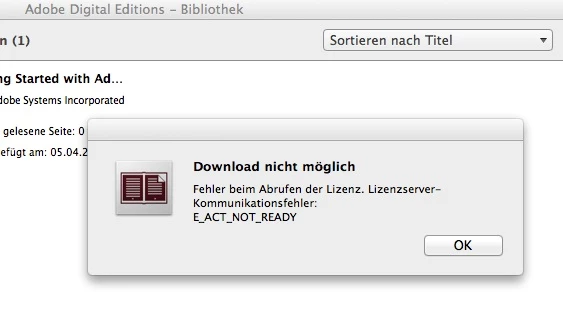
Any help is welcome.

Martin

    This topic has been closed for replies.
    Correct answer shreya

    Hello Martin,

    1. On ADE 3.0, try keyboard shortcut: Command+Shift+D to deauthorize Adobe Digital Editions.

         Now again AUTHORIZE ADE

         Help-> authorize computer.


    2. For error, "Document is licensed to an other user account.

    This error comes when you previously downloaded the book with some other authorization credentials in ADE.

    Solutions:

    1. Make sure ADE is authorized with same credentials, as it was authorized when book was downloaded for the first time.

    Then this error will not come.

    Hope this works for you !!

    1 reply

    Adobe Employee
    April 29, 2015

    For this problem, you need to deauthorize and authorize ADE again.

    Launch ADE

    Help -> Erase authorization.

    ADE will be deauhorized.

    Now again AUTHORIZE ADE

    Help-> authorize computer.

    Error will be fixed !!

    Participant
    April 29, 2015

    Dear Shreya

    thanks for your answer! It made sense to me, that must be the problem, and the solution. My computer though had other opinions ...

    1) I can't find "Deauthorize" in any of the menus. In the help-menu it only says that I am already authorized.

    2) .. but to the wrong one: When I import a certain file, I get the message "Document is licensed to an other user account." Hmpf!

    So: How can I "deauthorize" in ADE 3.0? Is this a translation problem (I use the german version).

    Thank you!

    Martin

    shreyaCorrect answer
    Adobe Employee
    April 30, 2015

    Hello Martin,

    1. On ADE 3.0, try keyboard shortcut: Command+Shift+D to deauthorize Adobe Digital Editions.

         Now again AUTHORIZE ADE

         Help-> authorize computer.


    2. For error, "Document is licensed to an other user account.

    This error comes when you previously downloaded the book with some other authorization credentials in ADE.

    Solutions:

    1. Make sure ADE is authorized with same credentials, as it was authorized when book was downloaded for the first time.

    Then this error will not come.

    Hope this works for you !!