


ADE doesnt work on iPad. “Book is no longer available in the device
I just spent 2 hours trying to trouble shoot an issue I keep having on Adobe digital editions, for which I cannot find any solution after scouting the forums and google.I just spent 2 hours trying to trouble shoot an issue I keep having on Adobe digital editions, for which I cannot find any solution after scouting the forums and google. Trying to get support from Adobe is nearly impossible. No options to contact you. How is this a costumer service I’m not sure. Anyway
I have a MacBook Air 2020 on which I downloaded the ADE and authorised it just fine. The library here
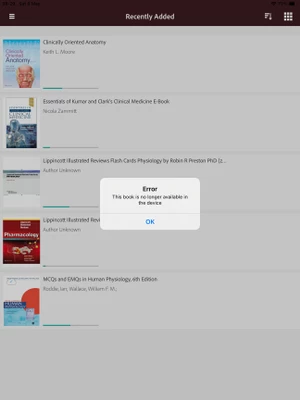
works. However, when I downloaded on my iPad 8- even after authorising the library doesn’t sync. Yes I have tried to wait. Yes I have tried to turn the iPad on and off. Yes I have tried to disinstall and install the app again. Yes I have tried to uninstall and install again the ade desktop and then refresh on both devices. Same thing but with iPad ade to desktop. No luck. I resorted to manually adding files to the iPad ADE, however once I close the app if I want to go back and access my books I get a message that says: “Error: this book is no longer available on the device”. Even though I made sure to double check that all the files ARE downloaded on the iPad.
After I get this error the whole app doesn’t work anymore. Of these files the only one I can access is the getting started with Adobe one. I have literally tried everything people said on the forum so please read what I have tried before suggesting it I do it again. I have uploaded files on the iPad probably a dozen times and it keeps happening. I also tried to upload them, instead that from files, from books or from emails. Same thing it opens fine the first time (I can navigate and also add bookmarks) but second time I try and open I get the message
 AdChoices