

November 29, 2016
Question

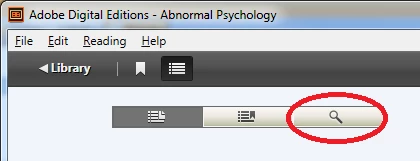
ADE Navigation Search Not Working

  • November 29, 2016
  • 2 replies
  • 339 views

I'm unable to get the Navigation Panel Search option to work for any of my eBooks. I have Abnormal Psychology ISBN 9781464171703 (PDF) and The Hound of Baskersville ISBN 9780451528018 (EPUB).

    This topic has been closed for replies.

    2 replies

    December 1, 2016

    Its been 48 hours and I still have not received a response, nor have any other issues posted the same day as mine or some posted before mine. Is this really the customer service experience offered by Adobe? If it doesn't work, good luck?

    Adobe Employee
    December 1, 2016

    Hi Todd,

    The list search in Navigation Panel has been disabled and does not work in the ADE 4.X

    To search your book, you may enter text in the top-right text box, or choose Reading > Find on Windows (Edit > Find on Macintosh). The reading panel highlights the found text.

    To navigate to each instance of a search term, click the left or right arrows on either side of the search box, or choose Reading > Find > Find Next or Find Previous on Windows (Edit > Find > Find Next or Find Previous on Macintosh).

    Regards,

    Sharad

    November 30, 2016

    How long does it normally take to get a response? My instructor has been kind enough to let me hold off taking my final until I can get this resolved and can search my eBook but I don't have a lot of time until I have to take it.