
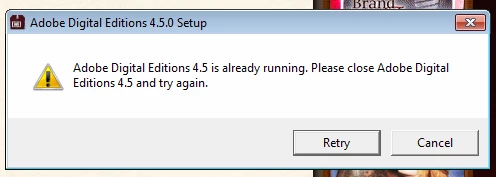
"Adobe Digital Editions 4.5 is already running" message appears when attempting to open an ACSM file
I'm attempting to help a client open an ACSM file on her computer running Windows 7. She recently upgraded to 4.5, and ever since has been unable to open ACSM files. When she tries, the ADE installation window opens instead of ADE and the computer attempts to install 4.5, although the program is already installed and can be opened from the shortcut on her desktop. She can add regular files to the app, but not ACSM files.
We spent an hour clearing all traces of the app from her computer, although we couldn't use the uninstaller.exe file as that prompted a similar message that said a 4.5 installer was already running. After restarting the computer, we tried reinstalling the app, and everything looked fine until we attempted to open an ACSM file. Then the same installer launched and the same pop-up appeared at the end of the install process. It doesn't matter whether ADE is already open or not...the same process begins and the same error message occurs.
I would welcome any recommendations for how to fix this problem.


 AdChoices