

Participant
Feb 11, 2016 5:34 PM UTC
Answered

Adobe Digital Editions won't open -acsm file

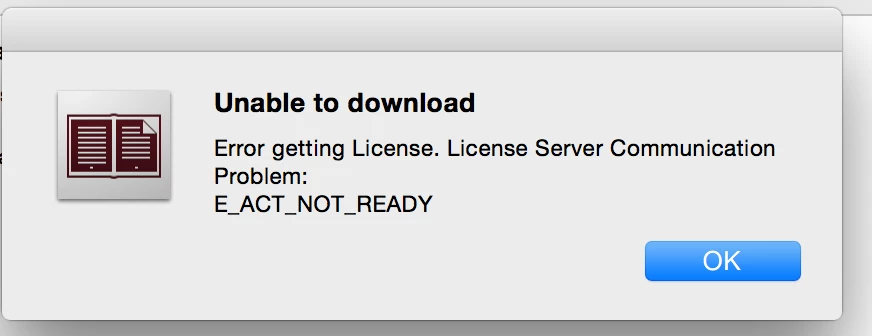
bought a ebook from the Google Store, when I wouwnload the .acsm file to open it with Adobe Digital Edition this window popos up and the book won't open.

This topic is closed to new replies. Start a new post to keep the conversation going.
Nanaky
NanakyCorrect answer
Participating Frequently
Feb 12, 2016 7:52 AM UTC

Macintosh:

  1. quit Adobe Digital Editions.
  2. Navigate to /Users//Library/Application Support/Adobe/Digital Editions and drag the activation.dat file to the trash.
    If you are using 10.7, see Access hidden library files | Mac OS 10.7 and later.
  3. Open Adobe Digital Editions and reauthorize.


Windows:

  1. Open Adobe Digital Editions.
  2. Press Control+Shift+D to deauthorize Adobe Digital Editions.
  3. Select Erase Authorization.
  4. Click OK and quit Adobe Digital Editions.

26 replies

Participant
Dec 18, 2022 8:06 PM UTC

Hello, after wasting the better part of 2 days trying to get ADE to open my acsm ebook, i downloaded KBO free. It opened my ebook flawlessly. I don't suggest wasting time with ADE. That is Adobe's job, not ours!

Translate
Dreamy_curiosity16B8
Participant
Dec 11, 2020 4:04 PM UTC

Thank you, it worked perfectly on MacOS 10.15.7

Translate
sandeepp23073769
Participant
Apr 12, 2019 8:06 PM UTC

I cant find digital edition files, am able to open .acsm file on my iphone, but same file is not opening on my mac and ipad pro, keeps getting error message.

Translate
Participant
Feb 1, 2019 7:44 AM UTC

Translate
Participant
Feb 1, 2019 7:45 AM UTC

This is the reply i get when i try to authorise my computer.

Translate
Participant
Jan 31, 2019 10:37 PM UTC

Is there any kind of update on what to do if adobe digital editions is unable to open an ACSM file?

Not sure if it's a good idea to de-authorize an entire machine, or to do a registry edit, just to test if that solution might work. You could lose access to books you already have.

In my case the ACSM file is visible, and Adobe Digital Editions sees it, but when I tell ADE to "add file" to the library, nothing happens. No error message. Nothing.

Translate
jorislav
Participant
Feb 19, 2016 10:48 PM UTC

Many thanks for that answer, it solved my problem (for now) .

Translate
Loekarin
Participating Frequently
Jul 18, 2018 12:50 PM UTC

I have the same problem as reported: Adobe Digital Editions won't open the ACSM-file. Instead, every time I try, the program crashes.

I have already uninstalled en re-installed ADE and I have the latest version.

I have also un-authorised my PC en re-autorised it again.

Translate
Nanaky
Participating Frequently
Feb 16, 2016 3:58 PM UTC

Can you add a screenshot of the error?

Translate
Known Participant
Feb 16, 2016 9:36 AM UTC

This solved some weeks ago. Today, reopening ADE i got the same problem. so I again dragged the activation.dat file to the trash, then reopened ADE, but when i authorize the computer now appears a window saying wrong "Wrong id or password for this selected ebook supplier. Try again".

Very very boring!

Is it possible that every time you open ADE you get the same problem? This make the program useless!

Not Adobe Style!


Translate
Nanaky
Participating Frequently
Feb 16, 2016 10:59 AM UTC

Can you login under www.adobe.com/de? If yes, reset your Password and used only letters and numbers.

Translate
Known Participant
Feb 16, 2016 11:24 AM UTC

Obviously, I can… but the problem is: why every time i had to reset the pwd to enter in ADE? this si foolish!

Translate
Participant
Feb 11, 2016 10:11 PM UTC

i have same problem !

Translate
Nanaky
NanakyCorrect answer
Participating Frequently
Feb 12, 2016 7:52 AM UTC

Macintosh:

  1. quit Adobe Digital Editions.
  2. Navigate to /Users//Library/Application Support/Adobe/Digital Editions and drag the activation.dat file to the trash.
    If you are using 10.7, see Access hidden library files | Mac OS 10.7 and later.
  3. Open Adobe Digital Editions and reauthorize.


Windows:

  1. Open Adobe Digital Editions.
  2. Press Control+Shift+D to deauthorize Adobe Digital Editions.
  3. Select Erase Authorization.
  4. Click OK and quit Adobe Digital Editions.
Translate
ayin89Author
Participant
Feb 15, 2016 2:18 PM UTC

thank you it worked!!

Translate