patriziaz20365860
Participating Frequently
August 20, 2016
Answered

Authorization denied

  • August 20, 2016
  • 2 replies
  • 1064 views

Good morning.

I own a Windows 8 and for several days I'm trying to read three books purchased on the net.

Initially I read them only on PC, now, after many attempts, not even that.

I tried everything, I got to call for service kobo, that after a few suggestions invited me to contact you.

Right now I have uninstalled and reinstalled ADE 3.0

I do not open anything and I transfer anything.

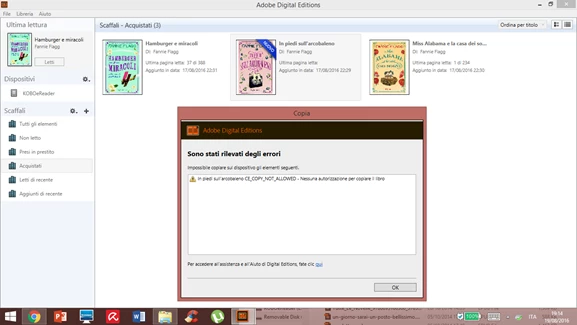
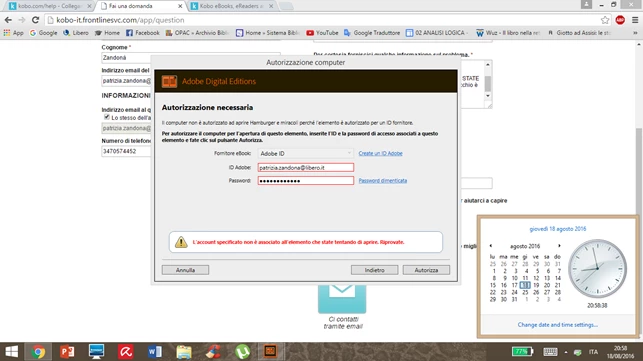
If I try to read up on pc it answers:

1-COPY_NOT_ALLOWED (when i try to copy the book on my device)

2- the vendor account you entered is not associated with the item you are trying to open
or
Can you help me please?

Patrizia

This topic has been closed for replies.
Correct answer Nanaky

Have you Digital Edition and your Reader authoire with the same Adobe ID?

2 replies

Participant
August 23, 2016

I'm having almost the same issue....

I had to chat with 2 agents who still couldn't help me. And since you are only allowed to authorize only 6 devices, I keep wondering why I can't authorize this one then when I've only did that only on one device and in 2014.

I don't have access to that old device, and I can't use a different e-mail cause my DRM books are only linked to this one.

Nanaky
Participating Frequently
August 24, 2016

KekeletsoXathi schrieb:

I'm having almost the same issue....

I had to chat with 2 agents who still couldn't help me. And since you are only allowed to authorize only 6 devices, I keep wondering why I can't authorize this one then when I've only did that only on one device and in 2014.

I don't have access to that old device, and I can't use a different e-mail cause my DRM books are only linked to this one.

Windows:

    Close all applications.

    Choose Start > Run.

    In the Open text box, type regedit and then press Enter. The Registry Editor opens.

    In the left pane of the Registry Editor, locate the following registry key: HKEY_CURRENT_USER\Software\Adobe\Adept

    Select the Adept key.

    Choose File > Export.

    In the Export Registry File dialog box, select Selected Branch under Export Range. Enter a name and location for the backup registry key, and then click Save.

    Right-click the Adept key and choose Delete.

    In the Confirm Key Delete dialog, click OK.

    Close the Registry Editor.

    Open Adobe Digital Editions and reauthorize.

Macintosh:

    quit Adobe Digital Editions.

    Navigate to /Users//Library/Application Support/Adobe/Digital Editions and drag the activation.dat file to the trash.

    If you are using 10.7, see https://helpx.adobe.com/x-productkb/global/access-hidden-user-library-files.html

    Open Adobe Digital Editions and reauthorize.

patriziaz20365860
Participating Frequently
August 25, 2016

...when i select the adept key...I dont' find the file Export...but  (Default), so I stop.

Nanaky
NanakyCorrect answer
Participating Frequently
August 23, 2016

Have you Digital Edition and your Reader authoire with the same Adobe ID?

patriziaz20365860
Participating Frequently
August 23, 2016

I suspect that the problem is that ... but I do not know how to solve it. I changed my pw to load recent books because for several years I have not bought e-books. It can be the problem?

Nanaky
Participating Frequently
August 23, 2016

Nein, das Passwort are not important. Has you in the past a other adobe ID?