


vw567
Participant
March 23, 2017
Answered

Cannot authorise my 2nd computer

  • March 23, 2017
  • 1 reply
  • 421 views

Hello,

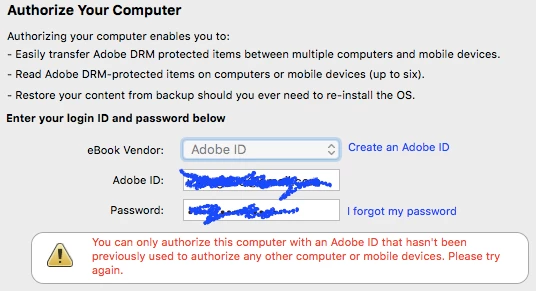
I have authorised one Windows computer in Adobe Digital Editions using my Adobe ID. Now I want to authorise my Macbook as well, but I get an error (please see screenshot). Why is that so? I thought the point of the ID was that we can now share books across our devices?

Thanks!

Best,

Viola
This topic has been closed for replies.
Correct answer Sharad Vatsa

Hi,

This issue occurs when you have previously activated with an anonymous ID. You would need to de-authorize the current user and then authorize again with the Adobe ID you wish to use. The deauthorization process deactivates the anonymous ID and allows you to sign in. If you made any purchases with the anonymous ID, contact the eBook provider to reset the activation information. Then, redownload the purchase and it is tied to the currently activated ID.

To fix this on the Mac, please follow the suggestions from the following doc -  Can't authorize with a previously used Adobe ID

Let us know in case this resolves it.

Regards,

Sharad

1 reply

Sharad VatsaCorrect answer
Adobe Employee
March 29, 2017

Hi,

This issue occurs when you have previously activated with an anonymous ID. You would need to de-authorize the current user and then authorize again with the Adobe ID you wish to use. The deauthorization process deactivates the anonymous ID and allows you to sign in. If you made any purchases with the anonymous ID, contact the eBook provider to reset the activation information. Then, redownload the purchase and it is tied to the currently activated ID.

To fix this on the Mac, please follow the suggestions from the following doc -  Can't authorize with a previously used Adobe ID

Let us know in case this resolves it.

Regards,

Sharad

vw567
vw567Author
Participant
March 29, 2017

Thanks for this; it worked. It might be worth adding this info to the authorization menu within the desktop client? I would never have guessed this issue, because the authorization menu didn't tell me that I wouldn't be successful logging in with my AdobeID if I had been using it anonymously. Adding your explanation to the error text (in my screenshot) would make things much clearer, I think.