

lauras36587668
Participant
March 19, 2018
Answered

Client certificate id invalid?

  • March 19, 2018
  • 19 replies
  • 8013 views

Hej,
I have a problem. Every time I try to open one of my books, I get this message:
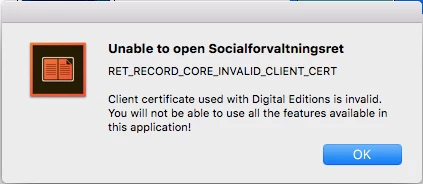
Someone can help with this?

    This topic has been closed for replies.
    Correct answer edwardt91362616

    Work Around I have found is - Delete version 4.5, download version 3.0 from the page you got 4.5 from, you will encounter this error- Error "E_ADEPT_INTERNAL" | Download protected e-book | Digital Editions (follow steps here to fix error and it should work)

    19 replies

    cristhianc7671195
    Participant
    March 20, 2018

    That link is for the latest one, above said that we need version 3.0, I do what you said with the link you provide and nothing happens

    Participant
    March 20, 2018

    I did all of this, and yes, it worked. Glad to have 3.0 back--it never crashed the way the 4.0 did. Hoping to keep this one. Thanks for the details.

    AJIT_M
    Inspiring
    March 20, 2018

    Hi,

    We have fixed the issue, please follow the steps mentioned in the below article-

    Error: RET_RECORD_CORE_INVALID_CLIENT_CERT

    Regards,

    Ajit

    Participating Frequently
    March 20, 2018

    je viens de le faire et ca ne marche pas chez moi je suis sous windows 10 et ADE ne s'ouvre toujours pas

    AJIT_M
    Inspiring
    March 20, 2018

    Hi,

    Please try to un-install the current version of ADE from your machine and then try to install ADE from the below URL and see if that resolve the issue-

    Adobe Digital Editions | Download

    Regards,

    Ajit

    AJIT_M
    Inspiring
    March 20, 2018

    Hi,

    We are working on this issue on priority and I will keep you posted once the fix is available for ADE 4.5.

    Regards,
    Ajit

    darlaj11231560
    Participating Frequently
    March 20, 2018

    No, that is not a correct answer, Adobe.  It's a work around, but doesn't fix the 4.5.7

    edwardt91362616
    edwardt91362616Correct answer
    Participant
    March 19, 2018

    Work Around I have found is - Delete version 4.5, download version 3.0 from the page you got 4.5 from, you will encounter this error- Error "E_ADEPT_INTERNAL" | Download protected e-book | Digital Editions (follow steps here to fix error and it should work)

    Participant
    March 19, 2018

    This worked! You are a life saver.

    edwardr22314911
    Participant
    March 19, 2018

    I have the same problem. has it been fixed? Adobe - please respond.

    John T Smith
    Community Expert
    Community Expert
    March 19, 2018

    This is a public forum with "some" Adobe staff participation, use the links below to make a report

    https://www.adobe.com/cfusion/mmform/index.cfm?name=wishform for feature requests or bug reports

    -or Feedback forum https://forums.adobe.com/community/creative_cloud/desktop-app/content

    edwardr22314911
    Participant
    March 19, 2018

    thanks

    Participating Frequently
    March 19, 2018

    meme probleme ici aussi pas moyen d'ouvrir un livre et en plus il m'a vider ma liseuse  incroyable pas moyen d'ouvrir

    que fait ADOBE ?????

    Participant
    March 19, 2018

    I am having the same problem and Adobe's response to this is honestly ridiculous. So many of us rely on this program for educational purposes so to have it suddenly stop functioning is incredibly detrimental. There are so many of us with the same exact problem and I am sincerely hoping that Adobe gets it together and fixes this. This is unacceptable for a company like Adobe.

    valeriag66953145
    Participant
    March 19, 2018

    I have the same problem! and I agree that the service should not have any problem of this type, especially when the it involves educational content. We will all appreciate if you solve it as soon as posible because we all are getting behind in our classes. Thank you!