Participant
September 29, 2015
Question

E_LIC_ALREADY_FULFILLED_BY_ANOTHER_USER

  • September 29, 2015
  • 1 reply
  • 816 views

Dear All

I have bought a biostatistics book from accp.com, downloaded ADE, authorized the device without AdobeID, downloaded the book (through .acsm link file) opened it, worked perfectly

then i  tried to authorize the device using my AdobeID, the book did not open and i have received the following error message:

Error getting license

License server communication problem: E_LIC_ALREADY_FULFILLED_BY_ANOTHER_USER
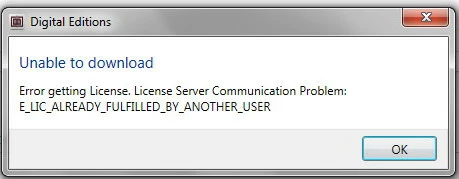
I searched for the downloded book in the ADE folder tried to open it and got this mmessage

I will appreciate if any one can help me in this issue, thanks

    This topic has been closed for replies.

    1 reply

    Devendra Kumar
    Participating Frequently
    December 1, 2015

    "I am getting the error 'Error getting License: License server communication problem: E_LIC_ALREADY_FULFILLED_BY_ANOTHER_USER' when opening Adobe Digital Editions."

    This error message is a result of a several different issues:

    1. User has installed an Adobe ID on more than one machine
    2. User has modified the clocks on their computer
    3. User has modified their account from a "Do Not Authorize" to an "Adobe Activated ID"
    4. User has uninstalled and re-installed Adobe Digital Editions, but the installation is not being completely removed from the computer.

    Resolution: Follow these steps:

    1. Uninstall Adobe Digital Editions using one of these two methods:
      • Start > Programs > Adobe > Adobe Digital Editions > Uninstall
      • Start > Settings > Control Panel > Add Remove Programs
    2. Initiate Uninstall
    3. In order to remove all remnants of Adobe Digital Editions / Adobe Adept from the machine a "Registry Edit" will need to be performed:
      • Start > Run > Regedit
    4. Search for HKEY_CURRENT_USER > Software > Adobe > Adept and Delete the full "Adept" folder
    5. Remove only the structures that are under the "SOFTWARE" extensions. This will remove the Adobe ID / License and Activation Keys
    6. Clear any outstanding tasks that may be associated to Adobe Digital Editions downloads
      • C:\data\my digital editions
      • C:\my documents\my digital editions
    7. Delete any documents within these folders:
      • Restore > Tasks
      • Restore > Failed
    8. Re-install Adobe Digital Editions

    This is the information I came across on the forums--hope it helps


    Regards,


    Devendra Kumar