


ebooks downloaded to ADE: can not be read on any other device.
Hello!
I bolded the important parts below and highlighted my questions.
I downloaded a document on my computer and opened it with ADE. I tried to open the same doc on my phone (which required the app bluefire). Bluefire comes up with this message when I try to open the ebook:
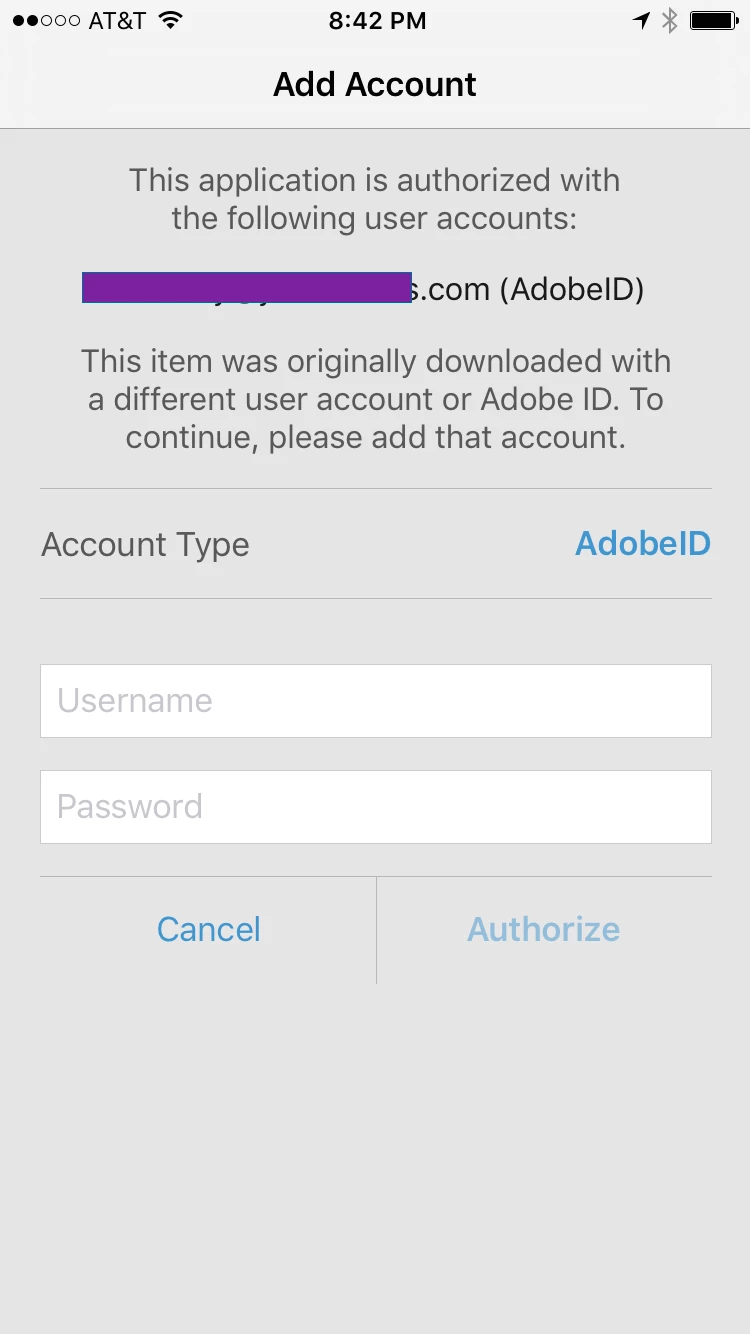
I contacted Adobe and Bluefire and was directed here ultimately.
I think Bluefire's response sums it all up well (I bolded the part I think is my issue. My question is, how do I fix it?! thanks!!😞
"That screen appears when trying to open an ebook that is licensed to a different user account than the one you used to authorize Bluefire Reader. An ebook becomes associated with an account the very first time you download it to a reader app. Did you perhaps first download this document on a desktop machine using Adobe Digital Editions? If so, best to open ADE on that machine and inspect what account you used. If you "skipped" the initial authorization of ADE (e.g. you did not authorize it with an Adobe ID account) then ebooks downloaded to ADE become licensed to the computer - rather than a user account - and thus can not be read on any other device (so how do I figure out if I did this and how do I change it?).
The other possibility is that you have created two different Adobe ID's. Sometimes it is easy to forget, especially if you have had Adobe Digital Editions installed for a long time. When you open ADE, there are menu items that enable you to view what account you used to authorize (mmmm ADE seems pretty basic on my computer and I cannot seem to glean any type of info about any "account" I set up. how do I figure out what "account" I made?).
Best of Luck,
Bluefire"
Thanks so much for you help anyone and everyone!!!
Sincerely,
Kimberly
 AdChoices