


Participant
July 16, 2013
Question

El equipo no esta autorizado

  • July 16, 2013
  • 1 reply
  • 1653 views

Requiero apoyo ya que descargue dos libros, pero despues autorice el equipo en Adobe D. E. despues ya no pude abrirlos, desintale el software y elimine el registro de windows como lo indican, pero al volver querer abrir el archivo me dice que requiere autorización,  le doy mi usuario jcarlos_ver@hotmail.com y mi password ********, el mismo con el que entro a la pagina, pero me dice que :
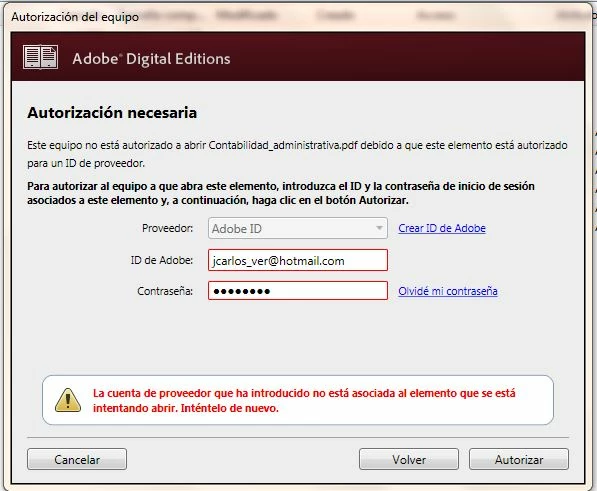
Que tengo que hacer para corregir el error, gracias.

Juan C Gutierrez

    This topic has been closed for replies.

    1 reply

    Inspiring
    July 16, 2013

    Google translate

    A veces ADE consigue su registro / activación confundido y en un estado semi-autorizada.

    Por desgracia, a menudo se da mensajes de error engañosos acerca de lo que está mal.

    Prueba a eliminar por completo cualquier autorización mediante ctrl-shift-D de ADE (Cmd-Shift-D si el Mac).

    Reiniciar ADE y, a continuación, volver a autorizar con su ID de Adobe.

    Sometimes ADE gets its registration/activation confused and in a semi-authorized state.

    Unfortunately, it often then gives misleading error messages about what is wrong.

    Try completely removing any authorization using ctrl-shift-D to ADE (cmd-shift-D if on Mac).

    Restart ADE, and then reauthorize with your Adobe ID.


    Participant
    July 16, 2013

    Autorice el equipo nuevamente con mi usuario y password, despues  ctrl-shift-D lo desautorize, cerre y volvi a entrar A ADE no se soluciono el problema tengo el mismo mensaje

    NO tengo solucion a mi problematica.

    Inspiring
    July 16, 2013

    La única otra cosa que se me ocurre es tratar la ADE mayor más fiable v1.7.2.

    Hay un montón de errores en ADE2.0. Trate de reemplazar ADE2.0 con el más viejo, pero más fiable v1.7.2.

    (Usted puede tener ambos instalados a la vez si lo desea.)

    Versión 1.7.2, es un poco difícil de encontrar, disponible en el sitio de Adobe para Windows y para Mac.

    http://helpx.adobe.com/digital-editions/kb/cant-install-digital-editions.html

    El software del foro a veces se corrompe el enlace anterior. No debe haber un espacio en blanco en 'editio ns.html'. Los siguientes redirige a la misma página: http://tinyurl.com/diged172

    ~~~~

    The only other thing I can think of is to try the older more reliable ADE v1.7.2.

    There are lots of bugs in ADE2.0.  Try replacing ADE2.0 with the older but more reliable v1.7.2.

    (You can have them both installed at once if you like.)

    Version 1.7.2, it is a little difficult to find, available on Adobe site for Windows and for Mac.

    http://helpx.adobe.com/digital-editions/kb/cant-install-digital-editions.html

    The forum software is sometimes corrupting the link above.  There shouldn't be a blank in 'editio ns.html'.  The following redirects to the same page: http://tinyurl.com/diged172