Participant
April 28, 2015
Answered

Error Check Activation (tried all advise to no avail, really desperate)

  • April 28, 2015
  • 1 reply
  • 432 views

So I got a new computer, runs windows 8. Installed adobe digital editions. Activated computer. All seems well.

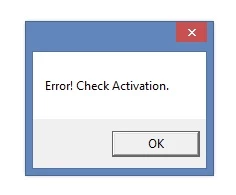
Went to download an ebook from my public library, get error "Error Check Activation."

Ok, so I go to erase activation under the help menu. Type in my information and get the message "Unable to erase authorization. Please try after some time."

So I wait some time and try again. Still doesn't work.

Ok, so I go to the adobe communities and find some people who have a similar issue. I follow ALL of the instructions, including going into the registry and deleting the the key. Nothing works.

I've installed and uninstalled 10 or more times, removes all visible files from my systems, removed the key from the registry, etc. Still doesn't work.

I'm so frustrated at this!  Is there anything else I can do short of wiping my computer clean and trying all over?
    This topic has been closed for replies.
    Correct answer shreya

    Here's the other error I get when trying to download a library book.


    Basically, your computer is still authorized.

    First you need to get rid of authorization.

    1. Quit ADE.

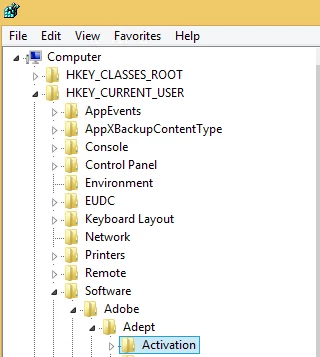
    2. Go to registry entry:

    3. Delete the "Activation" entry. [ This will deauthorize ADE ]

    4. launch ADE

    5. Now authorize ADE again by Help ->Authorize Computer

    Hope this works !!

    1 reply

    Adobe Employee
    April 29, 2015

    ok, try following steps:

    1.

    Choose Start > Run.

    In the Open text box, type regedit and then press Enter. The Registry Editor opens.

    In the left pane of the Registry Editor, locate the following registry key:

    HKEY_CURRENT_USER\Software\Adobe\Adept

    Right-click the Adept key and choose Delete.

    In the Confirm Key Delete dialog, click OK.

    2. Now uninstall ADE

    3. Download the latest ADE 4.0.3.114137

    http://www.adobe.com/solutions/ebook/digital-editions/download.html

    4. Now authorize ADE by : Help -> Authorize Computer.

    Hope this works !!

    If not, paste snapshot of the error message.

    Thanks

    Participant
    May 4, 2015

    I already tried that and it didn't work. as I stated above. I also tried erasing all of my adobe software, anything in the registry that may point to this program, any and all files that are in the appdata folder that pertain to Adobe and none of that worked as well. I'm pretty sure a snapshot of the error message isn't going to do you any good as its the exact same error that many, many people on this board are having. But heres a snapshot anyway.

    I'm done with this software. So angry.

    Participant
    May 4, 2015

    Here's the other error I get when trying to download a library book.