
Participant
August 20, 2013
Question

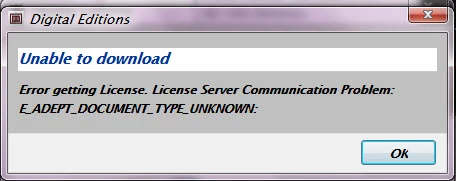
error message: unable to download error getting license

  • August 20, 2013
  • 1 reply
  • 758 views

Yesterday, it suddenly refused to download. I waited a day to see if it was a server problem. Last night, same issue and then again this morning. I was trying to add a book. It had a .acsm file extension which I know it is a DRM protected file and that ADE is what is used to download the book with. I had no problems with this  before.
This topic has been closed for replies.

1 reply

Inspiring
August 21, 2013

Possible reason ...

Sometimes ADE gets its registration/activation confused and in a semi-authorized state.

Uninstalling and reinstalling does not help.

Unfortunately, it often then gives misleading error messages about what is wrong.

A common incorrect message informs you that the ID is already in use on another computer and cannot be reused.


This can often be resolved by completely removing any authorization using ctrl-shift-D to the Library screen on ADE (cmd-shift-D if on Mac).

Restart ADE, and then reauthorize with your (old) Adobe ID.


Participant
December 30, 2013

I have done that, but it didn't resolve my problem. I'm still getting the error.

I have reset my computer and since then, I have lost all my books in my library. I want to redownload the books in my Adobe digital app.

Please help!

Inspiring
December 30, 2013

See (possibly not very satisfactory) answer in your other thread.