


Participant
March 29, 2015
Question

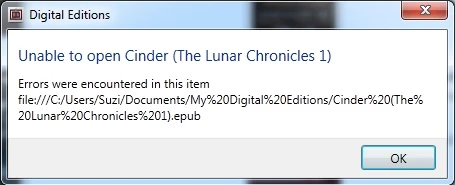
Errors were encountered in this item

  • March 29, 2015
  • 1 reply
  • 9848 views

Downloaded 3 books I bought today - they downloaded to digital editions with no problem. However, when I tried to open them, or copy them to a device, it errored and wouldn't do it. The account is authorised, the device is authorised. I have tried re-downloading which has not changed the outcome. Is this a digital editions problem, or a file problem with the actual book?
This topic has been closed for replies.

1 reply

Adobe Employee
March 30, 2015

Hello,

Screenshot 1: Please ensure your ebook is present in the location shown in error dialog.

If yes, Quit ADE and launch again.

Try to open the book again

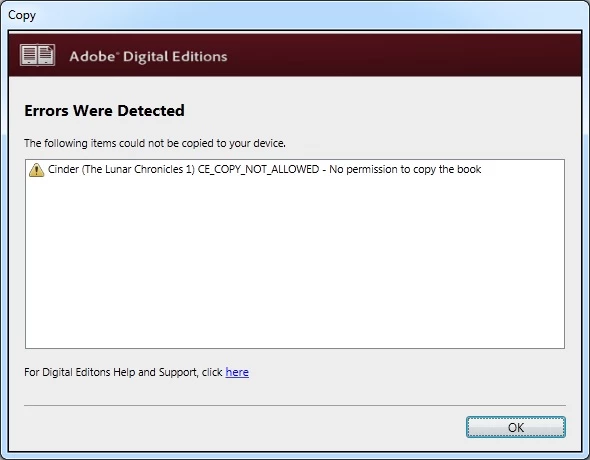
Screenshot 2: "CE_COPY_NOT_ALLOWED"

Please check the following:

1. Open the file in Adobe Digital Editions.

2. Go to File -> Item Info

OR

1.Select the file thumbnail in ADE library

2. Right click and click on "Item Info"

Check under permissions, Copying permission

Thanks

Participant
March 30, 2015

Thanks for your reply.
The ebook is present in the location shown - I've tried quitting and relaunching, I've tried re-downloading from kobo with no luck.
I can't open the book in ADE at all, it won't even open on the computer to read.
I've downloaded the kobo desktop app and I can read the file fine there, but I want to be able to put it on a device to read.

Adobe Employee
March 30, 2015

Please ensure  ADE is currently authorized with credentials that was used during book download.

You can also try one more thing:

1. First take backup of the particular ebook that you are trying to open

2. Now, Copy the ebook from My Digital Editions folder to some other location in your machine.

3. Launch ADE, Go to File->Add to library.

4. Give the path as new location where you copied the ebook.

Ebook should get added to library. Now try to open the book.

Thanks !!