


How to change the e-book permissions?
Hello Everyone,
I have bought an e-book from a Brazilian vendor (Saraiva) and downloaded the acsm file from its online page.
After that, I installed Adobe Digital Essentials (Windows 10) and opened the acms file in order to convert to an epub format so I could read it on the Saraiva device (it is called Lev and has ADE support - SaraivaReader ).
But, as soon as I started ADE, it asked me to login to my adobe account. So, I inserted my Adobe ID and password and then dropped the acsm file into the ADE.
Unfortunately, since I have logged in with my Adobe ID, the acsm file as well as the epub were automatically licensed to it as you can see in the image below:
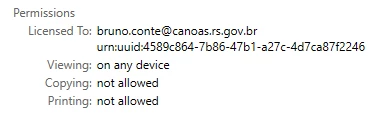
Now, I can't find a way to license it to my Saraiva account in order to read the e-book in the device. It is very frustrating and annoying. And even if I deauthorized the computer and try to authorize with the Saraiva account, the ADE doesn't allow me to open the acms file on the computer.
Would you guys please tell me a solution for this problem? I think that changing the permissions from the file would easily solve the case.
Best regards,
Bruno Conte
 AdChoices