
Participant
November 17, 2022
Question

I got E_LIC_LICENSE_SIGN_ERROR after correctly authorizing Adobe ID

  • November 17, 2022
  • 5 replies
  • 1781 views

Hello,

I recently downloaded a book (The Lost Metal) for my Sony E-Reader. I followed the guide to set up my Adobe ID in Adobe Digital Editions, but nevertheless how i try to import the book, i always get this message:
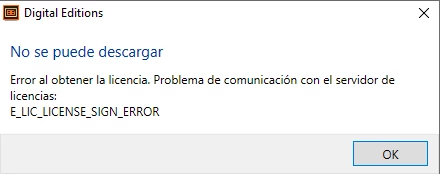
 

I already deleted the authotization, restarted the software, authorized again and downloaded a new version of the .acsm, but it keeps happening. 

Also, worth noting that the app for Sony E-Reader confirms my Adobe ID, but is not able to download the full ebook.

Anyone with similiar issues?

5 replies

Participant
April 16, 2025

Hello, I'm having the same exact problem I tried different things, such as uninstall, unauthorise the computer and reauthorise it, I also checked the default thing. I even created a new account and tried on a different computer. Did anyone find any other option to fix this problem???

Participant
November 21, 2022

I've got exactly the same problem, after years of problem-free downloading. I've tried de-authorizing and re-authorizing ADE several times, and I've upgraded to the latest ADE. No changes, nothing works.

I've reported the problem to Google Play and Kobo. Because I've got a Kobo reader, I can still downloaded ebooks directly from Kobo, but nothing from my usual sources. I feel very angry with Adobe.

Participating Frequently
November 19, 2022

My app stopped working mid-November; I got an error message "Check Activation", so E-Books wouldn't download from BorrowBox.With Adobe Support I have found a solution - it's about having correctly recognised authorisation:


  1. Uninstall the faulty ADE 4.5.11
  2. From Adobe's website re-install ADE 4.5.11 (I use the Windows edition)
  3. Open the ADE, go to Help, and select Erase Authorization. Follow the steps.

4 Go back to Help, select Authorize the Computer and follow the steps outlined (they are very clear - you need a user name (your own, [the administrator] email address, and to create a password).

  1. Go to Help, and select Authorization Information. Your details (user name and Adobe vendor ID) should be clearly visible (and ticked as 'Default)
  2. Close the ADE. Go to BorrowBox and test out a download. It should work, and then you can transfer the Ebook to Kobo.

Note: I tried this sequence several times before it magically worked - persist.


It took me over 12 hours of Live Chat with a number of Adobe consultant's before one  (Vishwarath) guided me through the above fix. Persist in requesting support, and don't ever be discouraged by any app provider using the excuse that "as it's free software we no longer support it" - that's not good enough. 

I hope sharing what's worked for me will be useful to the thousands of ADE 4.5.11 users whose app has suddenly stopped working.

I have shared this solution with Bolinda (the owner of BorrowBox). ADE 4.5.11 is a great app, and I happily use Adobe programs.


I welcome any feedback. Good luck,

Garry

Participant
November 20, 2022

Thank you very much for the detailed description. I have already done all this and my account is default. But I still can't add the .acsm extension book purchased on the Google Books page to the library.

Participant
November 18, 2022

You're welcome, yes, me too. I already deleted adept, deleted adobe digital editions, changed my password, adobe confirms my account and I can't add the acsm book I bought to my library...I'm using Windows 7...

Participant
November 18, 2022

I also have a Sony Reader and I'm getting the same error for the same book. I got it from Casa del Libro.


I hope we find a solution soon.


Un saludo.

Participant
November 19, 2022

I got the exact same problem [same book 🙂 and La Casa del Libro]. I can not add it to my ADE library so I did not even get to try to send it to my Cervantes 3 eReader. 


I hope the error is fixed quickly.


Un saludo,

Saltamundos