


Multiple version of an individual borrowed library book displays in ADE
I have been using Adobe Digital Editions to upload ePUB versions of borrowed library books from OverDrive. A few days ago I attempted to upload a newly borrowed ePUB book on to my Nook and it wouldn't open on the Nook. I can read in on the PC, not the nook.
I have uninstalled and reinstalled ADE, I have unauthorized my nook and my PC and reauthorized the devices to no avail. I have returned the books to the library and I have borrowed them again. I downloaded the new versions and I still see multiple versions of the book and not one of them opens on the Nook. No I receive the message "Loan Token not found."
My husband has a kindle and NEVER has this issue of course he is not forced to use Adobe Digital Editions either.
MY Nook is a model number BNRV300
What I have tried to date:
Unauthorized Nook
Unauthorized PC
Uninstalled ADE
Reinstalled ADE with a new download from Adobe
Authorized PC
Authorized Nook
I deleted the .adobe-digital-editions folder as recommended in a different post.
I have removed all items from the ADE library, however when I launch the ADE program again they all show up again.
I deleted the ePUB files directly off the Nook
I have returned the library book and borrowed it again.
I have powered the nook off and turned it back on and I still receive the "Loan Token not found" error.
All to no avail!
How do I get ADE working correctly again? Is there a deep uninstall process that removes all know parts of the ADE from my system so a new version can be installed? you can also see how ADE has the wrong book cover for Murder in the Paperback Library.
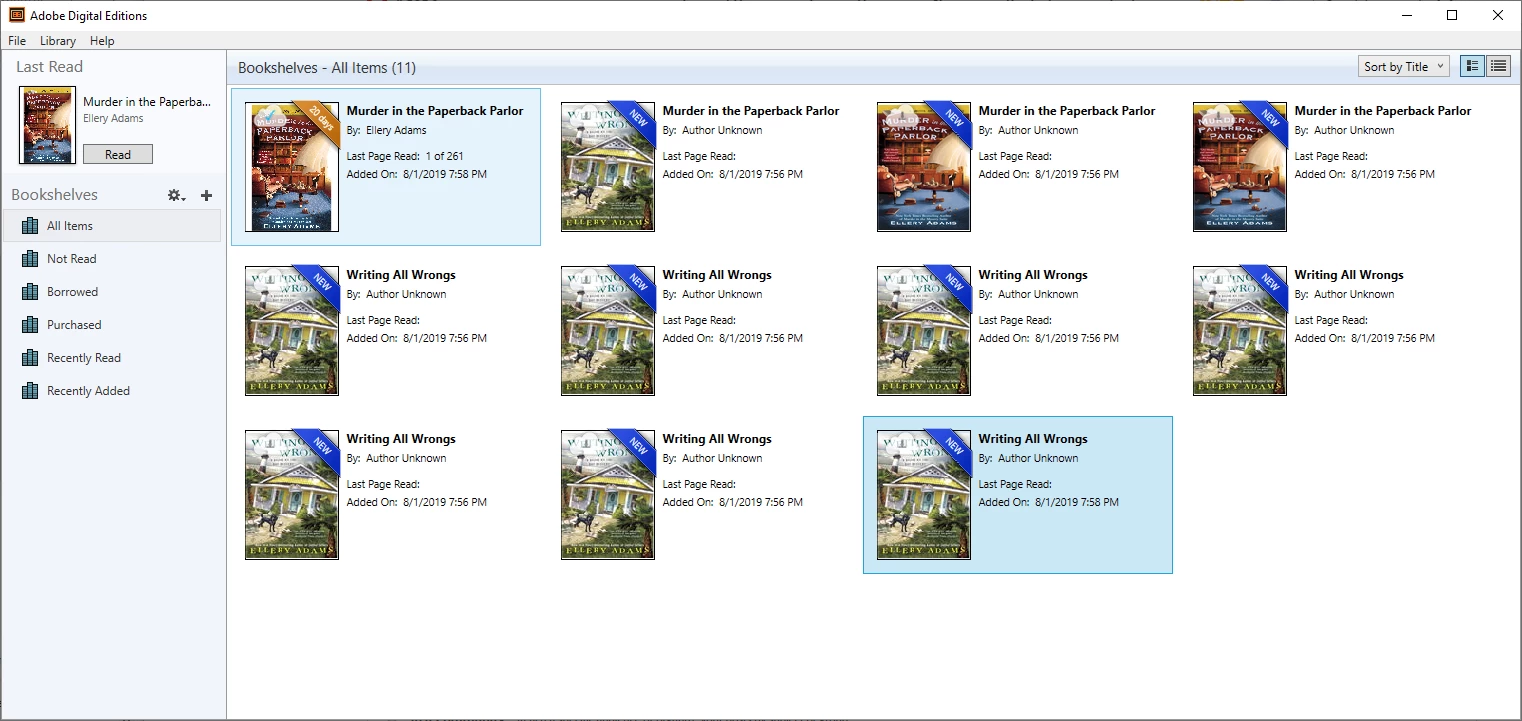
What is going on? I love to read and this is a major problem!!!
Regards,
TwinPalmsHome
 AdChoices