


M_A130095
Known Participant
February 23, 2015
Answered

Need help authorizing Adobe Id on adobe digital editions

  • February 23, 2015
  • 2 replies
  • 1537 views

I have an Adobe ID and I can use it to log on my account online, but I have been trying to authorize my Adobe Digital editions with that ID and cannot do so. I downloaded this Adobe Digital Editions software from online library.
This topic has been closed for replies.
Correct answer shreya

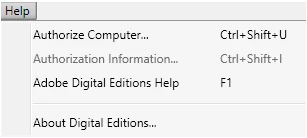
There is no option to erase authorization...


I think you are using Adobe Digital Editions version 3.0.

To de-authorize on it, keyboard shortcut is: ctrl+shift+d.

key in this shortcut, you will get de-authorization dialog.

Hope this works !!

2 replies

tanavij40503724
Participant
February 25, 2015

I am also facing the same problem. I downloaded different books and tried, I uninstalled the program and tried after installing it again but its not working. I am using Windows 7 on my PC.

Adobe Employee
February 25, 2015

For this problem, you need to deauthorize and authorize ADE again.

Launch ADE

Help -> Erase authorization.

ADE will be deauhorized.

Now again AUTHORIZE ADE

Help-> authorize computer.

Error will be fixed !!

M_A130095
M_A130095Author
Known Participant
February 25, 2015

There is no option to erase authorization...

Adobe Employee
February 24, 2015

What is the error message you are getting ?

M_A130095
M_A130095Author
Known Participant
February 24, 2015

Here is the picture. And (just to give you more info), this program was downloaded from a library website, not bought when I made this account, so the problem might be because of that (which I can understand), but I need to figure out how to connect the two.

Participant
February 24, 2015

I have the same problem with a differend message E_ADEPT_UNKNOWN http://adeactivate.adobe.com/adept/SignInDirect.

Please advise.

Thank you.